Time filter
Use the time filter to set the time range of the data that is displayed in the Dashboard and Discover applications. The filter supports intervals in minutes, hours, days, weeks, months, or years.
The default time range is Last 15 minutes. You can change the default at Dashboards Management > Advanced Settings > Time filter defaults, or select a time range at the application level.
Selecting a time range
You can select a moving or static window as the time range at the application level.
Selecting a moving time window
To select a moving time window, follow these steps:
-
From an OpenSearch Dashboards application (Discover, Dashboards, or Visualize), select the
 (calendar) icon on the right of the search bar.
 -
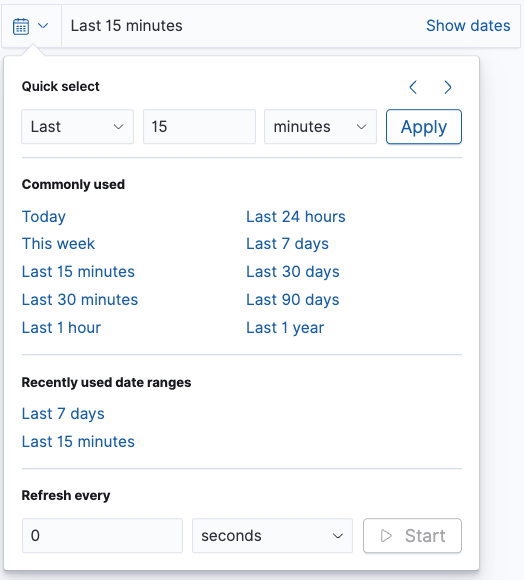
Select one of the time filter options, as shown in the following image:
- Quick select: Choose a time based on the last or next number of seconds, minutes, hours, days, or another time unit.
- Commonly used: Choose a common time range, for example Today, Last 7 days, or Last 30 days.
- Recently used date ranges: Select a previously used time range.
-
Select an automatic refresh period from Refresh every.
Selecting a static time window
To select a static time window, follow these steps:
-
Choose Show dates.
-
Choose a start time:
-
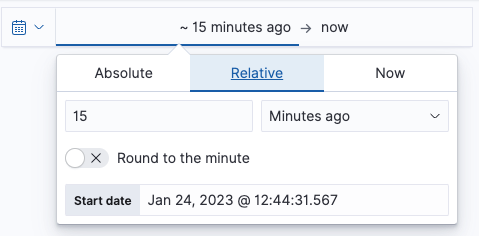
Select the currently displayed start time, as shown in the following image.
-
Select Absolute, Relative, or Now.
-
Using the selected framing, choose a start date and time.
-
-
Choose an end time:
-
Select the currently displayed end time.
-
Select Absolute, Relative, or Now.
-
Using the selected framing, choose an end date and time.
-
-
Choose Update to apply changes, as shown in the following image.
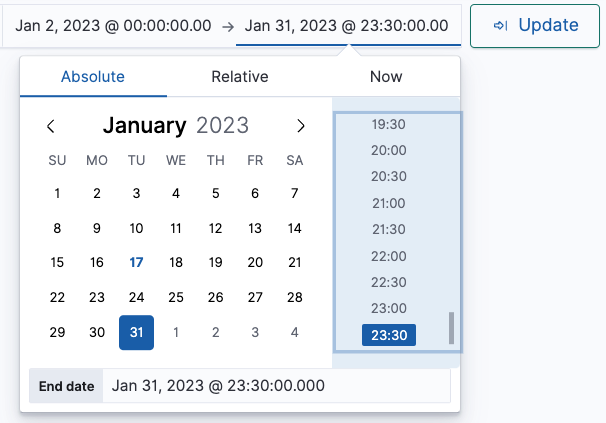
The data table or visualization displayed in the application automatically updates to reflect the new time interval filter.