You're viewing version 3.7 of the OpenSearch documentation. This version is no longer maintained. For the latest version, see the current documentation. For information about OpenSearch version maintenance, see Release Schedule and Maintenance Policy.
Run queries in the Dev Tools console
The Dev Tools console lets you send Query DSL queries to OpenSearch instead of using cURL in your terminal.
Try it: Write and run a query
-
To open the Dev Tools console, select Dev Tools on the main OpenSearch Dashboards page or select Management > Dev Tools from the left navigation menu. In installations with workspaces enabled, select the code icon (
 ) in the lower-left corner of the navigation panel.
 -
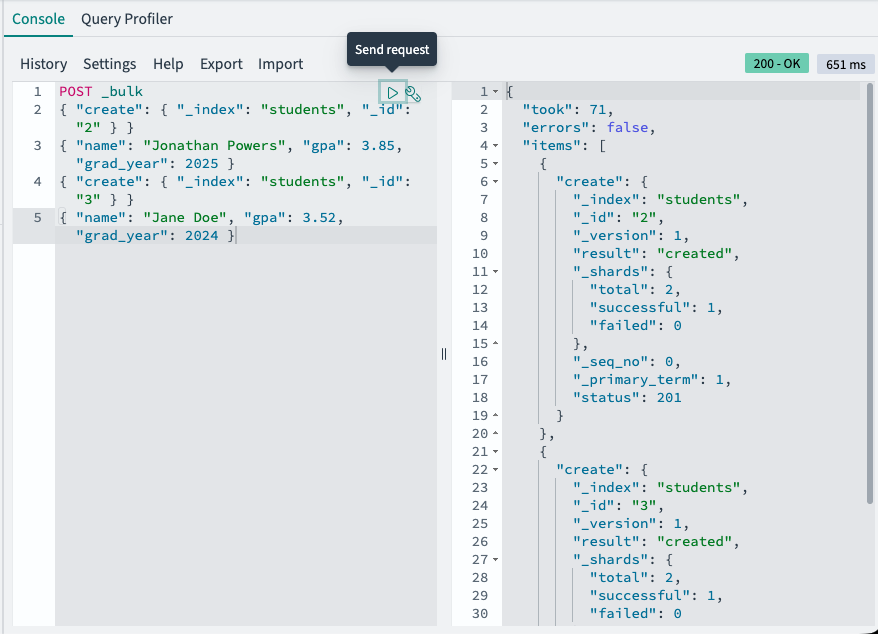
Write a query in the editor pane on the left side of the console. For example, enter the following query to index some documents:
POST _bulk { "create": { "_index": "students", "_id": "2" } } { "name": "Jonathan Powers", "gpa": 3.85, "grad_year": 2025 } { "create": { "_index": "students", "_id": "3" } } { "name": "Jane Doe", "gpa": 3.52, "grad_year": 2024 } -
To send the query, place the cursor anywhere in the query text and select the play icon (
 ) on the upper right of the request, or press
 Ctrl/Cmd+Enter.OpenSearch displays the response in the pane on the right side of the console.
-
Try a search query. Enter the following request to retrieve all documents from the
studentsindex:GET students/_search { "query": { "match_all": {} } } -
Select the play icon to send the request and view the results.
Next steps
- For the full Dev Tools reference, see Running queries in the Dev Tools console.
- For the full query language reference, see Query DSL.