You're viewing version 3.8 of the OpenSearch documentation. This version is no longer maintained. For the latest version, see the current documentation. For information about OpenSearch version maintenance, see Release Schedule and Maintenance Policy.
Getting started with OpenSearch
OpenSearch is a distributed search and analytics engine based on Apache Lucene. Use it as a data store and vector database to add search to an application, build AI-powered applications, and analyze logs, metrics, and traces.
Watch a demo
Watch this video to explore key features of OpenSearch and see a demo of its core capabilities in action.
Learn OpenSearch basics
To learn the basics of OpenSearch, install it, and run your first searches, follow these steps in order. You’ll learn how to store and retrieve data using OpenSearch and how to explore sample data using OpenSearch Dashboards, the web interface for OpenSearch.
Learn how OpenSearch stores data and ranks search results.
Install OpenSearch and OpenSearch Dashboards using Docker.
Send REST API requests to your cluster from a terminal or the Dev Tools console.
Create your first OpenSearch index and add data to it.
Index multiple documents at once using the Bulk API and learn about other ingestion methods.
Query your data using query strings and query DSL.
Apply what you’ve learned to explore and summarize data in a larger dataset.
OpenSearch components
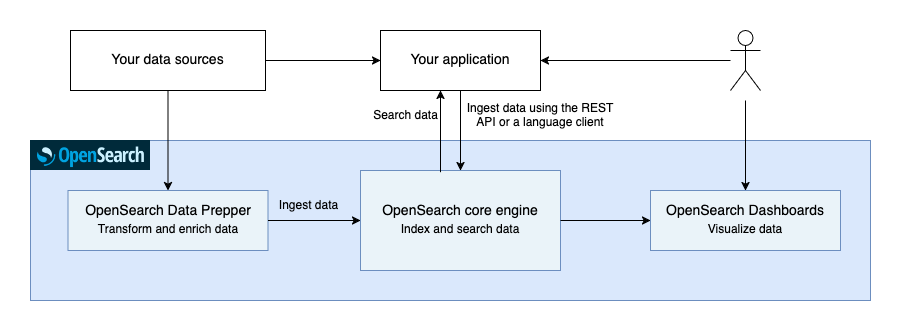
OpenSearch is more than just the core engine. The following components ingest, query, and visualize the data in your cluster:
- OpenSearch Data Prepper: A server-side data collector capable of filtering, enriching, transforming, normalizing, and aggregating data for downstream analysis and visualization.
- OpenSearch Dashboards: The OpenSearch data visualization UI.
- Clients: Language APIs that let you communicate with OpenSearch in several popular programming languages.
The following image shows how these components interact.
OpenSearch provides additional tools for specific tasks:
- OpenSearch Benchmark: Measures the performance of your cluster.
- Migration Assistant: Helps you migrate to OpenSearch from another search engine.
Common use cases
OpenSearch supports various use cases, with search and observability among the most common.
Search
After adding your data to OpenSearch, you can perform full-text searches on it with all of the features you might expect: search by field, search multiple indexes, boost fields, rank results by score, sort results by field, and aggregate results. Unsurprisingly, builders often use a search engine like OpenSearch as the backend for a search application—think Wikipedia or an online store. It offers excellent performance and can scale up or down as the needs of the application grow or shrink.
Vector search
Search applications often need to match on meaning rather than on exact words. With vector search, OpenSearch stores vector embeddings—numerical representations of data such as text, images, or audio—and returns the results that are closest to a query in that vector space. This approach underlies semantic search, retrieval-augmented generation (RAG), and multimodal search, and you can combine it with full-text search in a single query. OpenSearch can generate the embeddings for you from machine learning models that you deploy to your cluster.
Observability
Another popular use case is observability, in which you take the logs, metrics, and traces from your applications and infrastructure, feed them into OpenSearch, and use the rich search and visualization functionality to identify issues. For example, a malfunctioning web server might throw a 500 error 0.5% of the time, which can be hard to notice unless you have a real-time graph of all HTTP status codes that the server has thrown in the past four hours. You can use OpenSearch Dashboards to build these sorts of visualizations from data in OpenSearch.
Next steps
- To learn how OpenSearch stores data and ranks search results, see Intro to OpenSearch.