You're viewing version 3.8 of the OpenSearch documentation. This version is no longer maintained. For the latest version, see the current documentation. For information about OpenSearch version maintenance, see Release Schedule and Maintenance Policy.
Index aliases
An alias is a virtual index name that points to one or more indexes. Query the alias and OpenSearch resolves it to the indexes behind it, so your clients can keep using one stable name while the indexes it covers change.
For example, if you store logs in monthly indexes and you usually query the last two months, create a last_2_months alias and update the indexes it points to each month. The queries in your application never change.
Aliases are also how you do the following:
- Switch from one index to another with no downtime, such as when you reindex into a new mapping and cut over once the copy is complete.
- Serve different views of the same data by attaching a filter to the alias.
- Keep environment-specific names, such as
production-dataandstaging-data, independent of the indexes they resolve to. - Route the requests that go through the alias to specific shards, so that a search reads fewer shards. For more information, see Manage aliases.
- Roll over time-series indexes behind a single write target. See Rolling over an index.
Aliases have the following characteristics:
- Alias changes are atomic. An alias never points to an unintended set of indexes, even for a moment.
- A wildcard pattern is resolved when the alias is created. Indexes created later that match the pattern are not added automatically.
- To write to an alias that points to more than one index, designate one of them as the write index.
- The filter on a filtered alias applies to all search, count, and delete-by-query operations through that alias.
Creating an alias
The examples in this section use two indexes, which you can create with the following requests:
PUT /logs-2024-01
PUT /logs-2024-02
The most basic alias points to a single index:
POST /_aliases
{
  "actions": [
    {
      "add": {
        "index": "logs-2024-01",
        "alias": "current-logs"
      }
    }
  ]
}
You can also attach aliases when you create the index:
PUT /logs-2024-03
{
  "aliases": {
    "current-logs": {},
    "all-logs": {}
  }
}
Switching an alias to a different index
Combine remove and add in one request so that the alias moves between indexes in a single atomic step:
POST /_aliases
{
  "actions": [
    {
      "remove": {
        "index": "logs-2024-01",
        "alias": "current-logs"
      }
    },
    {
      "add": {
        "index": "logs-2024-02",
        "alias": "current-logs"
      }
    }
  ]
}
Pointing an alias to multiple indexes
Use the indices field to cover several indexes with one alias:
POST /_aliases
{
  "actions": [
    {
      "add": {
        "indices": ["logs-2024-01", "logs-2024-02"],
        "alias": "recent-logs"
      }
    }
  ]
}
Designating a write index
An alias that points to multiple indexes rejects indexing requests until one of those indexes is marked as the write index:
POST /_aliases
{
  "actions": [
    {
      "add": {
        "index": "logs-2024-02",
        "alias": "active-logs",
        "is_write_index": true
      }
    },
    {
      "add": {
        "index": "logs-2024-01",
        "alias": "active-logs"
      }
    }
  ]
}
Filtering an alias
Attach a filter to an alias to expose a subset of an index under its own name. Create an index with a level field to filter on:
PUT /application-logs
{
  "mappings": {
    "properties": {
      "level": {
        "type": "keyword"
      }
    }
  }
}
The following alias returns only the documents in application-logs whose level field is ERROR:
POST /_aliases
{
  "actions": [
    {
      "add": {
        "index": "application-logs",
        "alias": "error-logs",
        "filter": {
          "term": {
            "level": "ERROR"
          }
        }
      }
    }
  ]
}
Inspecting and querying aliases
The following table lists common alias requests.
| Task | Request |
|---|---|
| List all aliases | GET /_cat/aliases?v |
| Get one alias | GET /_alias/current-logs |
| Check whether an alias exists | HEAD /_alias/current-logs |
| Search through an alias | GET /current-logs/_search |
For all alias operations and their parameters, see Alias APIs.
Index aliases in OpenSearch Dashboards
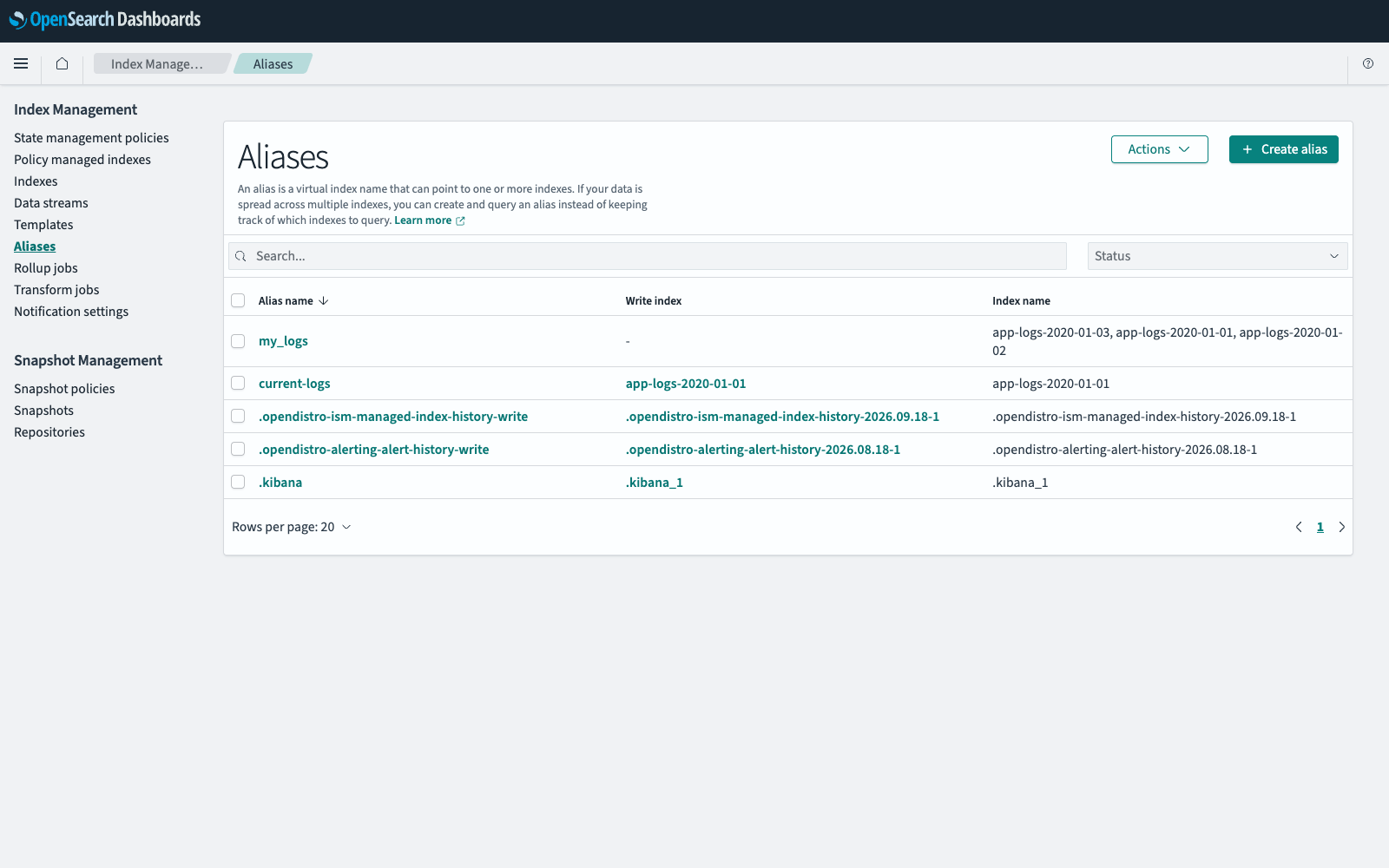
To navigate to the Index Management page, go to Management > Index Management on the top menu. Select Aliases to list the aliases in your cluster, with the write index and the indexes of each one.
The following image shows the Aliases page.
Creating an alias
An alias covers at least one index, so create the indexes before the alias. To create an index, see Creating an index.
- In Index Management, select Aliases, and then select Create alias.
- Enter a name for the alias.
- In Indexes or index patterns, select or enter the indexes and index patterns that the alias covers.
- Select Create alias.
Editing an alias
- In Index Management, select Aliases.
- Select the alias name in the Alias name column.
- In Indexes or index patterns, add or remove indexes and index patterns. You cannot rename an existing alias.
- Select Save changes.
Deleting an alias
- In Index Management, select Aliases.
- Select the checkbox next to each alias that you want to delete.
- Select Actions, and then select Delete.
- Enter
deletein the confirmation dialog, and then select Delete.
Deleting an alias does not delete the indexes behind it.
Rolling over an alias
- In Index Management, select Aliases.
- Select Actions, and then select Roll over.
- In Configure source, select the alias to roll over. Its current write index is displayed as Assigned source index.
- In Configure new rollover index, enter a name for the new write index, then enter its definition, settings, and mappings. To reuse the configuration of the current write index, select Import from old write index.
- Select Roll over.
The Write index column shows the new write index, and the Index name column lists all of the indexes in the alias.
Refresh, flush, clear cache, and force merge are also available from the Aliases page and apply to the open backing indexes of the selected aliases. For those procedures, see Index maintenance in OpenSearch Dashboards.