You're viewing version 3.8 of the OpenSearch documentation. This version is no longer maintained. For the latest version, see the current documentation. For information about OpenSearch version maintenance, see Release Schedule and Maintenance Policy.
Data streams
A data stream is a single name that you write to and search, backed by a series of hidden indexes that OpenSearch rolls over for you. Indexing requests go to the current write index, and search requests go to all of the backing indexes.
Data streams are for continuously generated time-series data, such as logs, events, and metrics, where documents accumulate quickly and older documents are never updated. Managing that data as plain indexes means creating a rollover alias, designating a write index, and repeating the same mappings and settings for each new index. A data stream does this from one index template.
Data streams have the following characteristics:
- Every document must contain a timestamp field. A document without one is rejected.
- A data stream is append-only. You cannot update or delete individual documents through the data stream name; you must address the backing index directly.
- Backing indexes are named
.ds-<data-stream>-<generation>and are hidden. The generation number increases with each rollover. - A data stream can only be created from an index template that contains a
data_streamobject.
Attach an Index State Management (ISM) policy to automate rollover and deletion of the backing indexes based on their age, size, or document count. The policy is applied to each backing index when it is created, so attaching a policy to a data stream affects only its future backing indexes. You do not need to provide the rollover_alias setting because the policy takes that information from the backing index.
To define granular permissions for a data stream, use its name as you would an index name. For more information, see Permissions.
Creating an index template for a data stream
A data stream is defined by an index template that contains a data_stream object. The template’s index patterns must match the names of the data streams that you intend to create:
PUT _index_template/logs-template
{
  "index_patterns": [
    "logs-*"
  ],
  "data_stream": {},
  "priority": 100
}
A data stream template claims its index patterns exclusively. While this template exists, creating a regular index whose name starts with logs- fails with cannot create index with name [...], because it matches with template [logs-template] that creates data streams only. Choose patterns narrow enough that they do not overlap with your regular indexes.
Documents indexed into a data stream created from this template must contain an @timestamp field. To use a different field name, specify it in timestamp_field. The template object accepts the same settings, mappings, and aliases as a regular index template and applies them to each backing index:
PUT _index_template/logs-nginx-template
{
  "index_patterns": [
    "logs-nginx"
  ],
  "data_stream": {
    "timestamp_field": {
      "name": "request_time"
    }
  },
  "priority": 200,
  "template": {
    "settings": {
      "number_of_shards": 1,
      "number_of_replicas": 0
    }
  }
}
The name logs-nginx matches both templates. OpenSearch applies logs-nginx-template because it has the higher priority. For more information, see Index templates.
Creating a data stream
Create the data stream explicitly to initialize its first backing index:
PUT _data_stream/logs-redis
You can also skip this step and start indexing. Because a matching template contains a data_stream object, OpenSearch creates the data stream on the first indexing request:
POST logs-staging/_doc
{
  "message": "login attempt failed",
  "@timestamp": "2013-03-01T00:00:00"
}
Ingesting data into a data stream
Index documents into a data stream by name, using the same Document APIs that you use for a regular index. Each document must contain the timestamp field defined by the template:
POST logs-redis/_doc?refresh=true
{
  "message": "login attempt",
  "@timestamp": "2013-03-01T00:00:00"
}
The refresh=true parameter makes the document searchable immediately, so that the search in the next section returns it. Omit it in production, where the refresh interval handles this.
A data stream accepts create operations only. An index operation that would overwrite a document, or an update or delete addressed to the data stream name, is rejected.
Searching a data stream
Search a data stream as you would an index or an alias. The request covers all of the backing indexes:
GET logs-redis/_search
{
  "query": {
    "match": {
      "message": "login"
    }
  }
}
The _index field of each hit contains the name of the backing index that holds the document:
Response
{
  "took": 1,
  "timed_out": false,
  "_shards": {
    "total": 1,
    "successful": 1,
    "skipped": 0,
    "failed": 0
  },
  "hits": {
    "total": {
      "value": 1,
      "relation": "eq"
    },
    "max_score": 0.13076457,
    "hits": [
      {
        "_index": ".ds-logs-redis-000001",
        "_id": "iCnxtaABPpBDXMo4kFWl",
        "_score": 0.13076457,
        "_source": {
          "message": "login attempt",
          "@timestamp": "2013-03-01T00:00:00"
        }
      }
    ]
  }
}
You can also query a data stream using asynchronous search, SQL, or PPL, and build visualizations on it as you would on an index or an alias.
Rolling over a data stream
A rollover creates a new backing index and makes it the write index of the data stream. Roll over manually with the following request:
POST logs-redis/_rollover
Response
{
  "acknowledged": true,
  "shards_acknowledged": true,
  "old_index": ".ds-logs-redis-000001",
  "new_index": ".ds-logs-redis-000002",
  "rolled_over": true,
  "dry_run": false,
  "conditions": {}
}
The generation number of the data stream increases with each rollover. For rollover conditions and parameters, see Roll Over API. To roll over automatically, use an ISM policy.
Inspecting data streams
The following table lists common data stream requests. The response to a get request contains the timestamp field name, the backing indexes, the generation number, the template that created the data stream, and its status, which is the lowest status of its backing indexes.
| Task | Request |
|---|---|
| List all data streams | GET _data_stream |
| Get one data stream | GET _data_stream/logs-redis |
| Get statistics for a data stream | GET _data_stream/logs-redis/_stats |
| Delete a data stream and its backing indexes | DELETE _data_stream/logs-redis |
For example, the following request returns the logs-redis data stream after one rollover:
GET _data_stream/logs-redis
Response
{
  "data_streams": [
    {
      "name": "logs-redis",
      "timestamp_field": {
        "name": "@timestamp"
      },
      "indices": [
        {
          "index_name": ".ds-logs-redis-000001",
          "index_uuid": "Xq04oCQ-TiCjIL81Q_ZL9g"
        },
        {
          "index_name": ".ds-logs-redis-000002",
          "index_uuid": "UBX0UhE9TFKTi-jB5mB7tQ"
        }
      ],
      "generation": 2,
      "status": "YELLOW",
      "template": "logs-template"
    }
  ]
}
You can use wildcards to address more than one data stream. Deleting a data stream deletes its backing indexes and cannot be undone; to remove data on a schedule, use an ISM policy instead.
For all data stream operations and their parameters, see Data stream APIs.
Modifying the backing indexes of a data stream
Add or remove the backing indexes of an existing data stream using the Modify Data Stream API. This is a metadata-only operation, so you can migrate an existing regular index into a data stream, or detach a backing index without deleting its data. To attach a restored backing index to a data stream during a snapshot restore, set attach_to_data_stream to true in the Restore Snapshot API.
Data streams in OpenSearch Dashboards
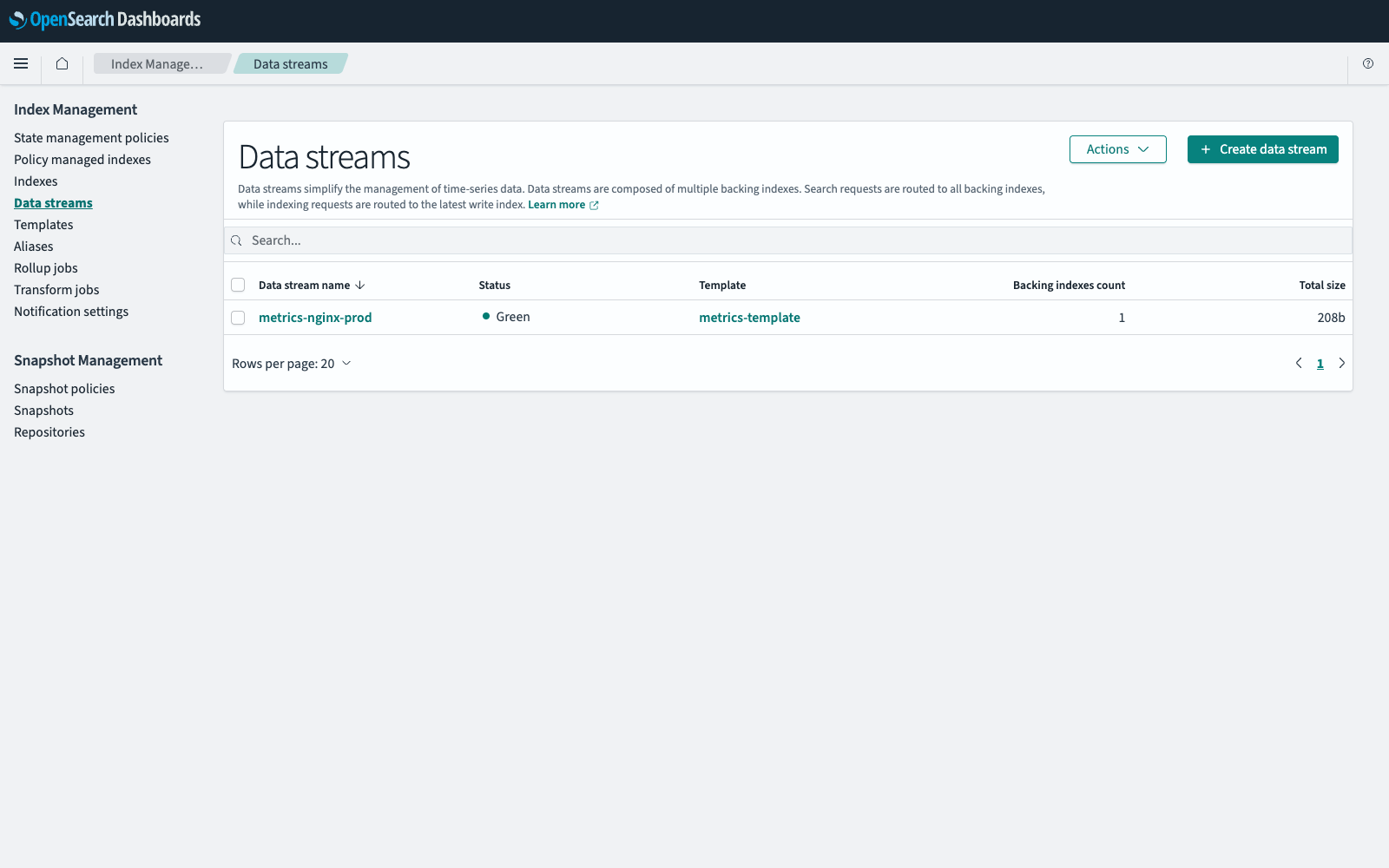
To navigate to the Index Management page, go to Management > Index Management on the top menu. Select Data streams to list the data streams in your cluster.
The Data streams table contains the following columns.
| Column | Description |
|---|---|
| Data stream name | The name of the data stream. |
| Status | The lowest health status of the data stream’s backing indexes: green if all primary and replica shards are assigned, yellow if at least one replica shard is unassigned, and red if at least one primary shard is unassigned. |
| Template | The index template that created the data stream. |
| Backing indexes count | The number of backing indexes that hold the data. |
| Total size | The storage used by the data stream across all primary and replica shards. |
The following image shows the Data streams page.
Viewing a data stream
Select the data stream in the Data stream name column. Data stream details shows its name, status, template, number of backing indexes, and timestamp field name. Backing indexes lists each backing index with its health, status, size, document counts, shard counts, whether it is the write index, and whether an ISM policy manages it. Select a backing index to see its details in the same form as a regular index. For more information, see Viewing index details.
Viewing backing indexes in the Indexes list
Backing indexes are hidden from the Indexes table by default:
- In Index Management, select Indexes.
- Select Show data stream indexes. A Data stream column is added to the table, showing which data stream each backing index belongs to, and a Data streams list is added to the table header.
- Optionally, select one or more data streams from the Data streams list to show only their backing indexes.
Creating a data stream
A data stream can only be created from an index template whose type is Data streams. To create one, see Creating an index template.
- In Index Management, select Data streams, and then select Create data stream.
- In Data stream name, start entering a name. As you type, a list of matching index patterns and their index templates appears.
-
Select an index pattern from the list, and then complete the name so that it matches the pattern.
Matching template shows the index template that contains the pattern. The values in Inherited settings from template are read-only.
- Select Create data stream.
Deleting a data stream
- In Index Management, select Data streams.
- Select the checkbox next to each data stream that you want to delete.
- Select Actions, and then select Delete.
- Enter
deletein the confirmation dialog, and then select Delete.
Deleting a data stream deletes its backing indexes. The data cannot be recovered.
Rolling over a data stream
- In Index Management, select Data streams.
- Select Actions, and then select Roll over.
- In Configure source, select the data stream to roll over.
- Select Roll over.
The Backing indexes table on the details page of the data stream contains the new write index.
Refresh, flush, clear cache, and force merge are also available from the Data streams page and apply to the backing indexes of the selected data streams. For those procedures, see Index maintenance in OpenSearch Dashboards.