You're viewing version 3.8 of the OpenSearch documentation. This version is no longer maintained. For the latest version, see the current documentation. For information about OpenSearch version maintenance, see Release Schedule and Maintenance Policy.
Long-running operation notifications
Introduced 2.8
Reindex, resize, force merge, and open operations can run for minutes or hours. When you send one of these requests with wait_for_completion set to false, it returns a task ID immediately instead of blocking. Configure a notification against that task ID, or against the operation type, to be told when the work finishes or fails rather than polling for it.
Notifications are delivered through the channels configured in the Notifications application, which supports Amazon Chime, Amazon Simple Notification Service (Amazon SNS), Amazon Simple Email Service (Amazon SES), email through SMTP, Slack, and custom webhooks.
Configuring notification settings
An lron_config object takes either a task_id or an action_name, and the choice determines how long the setting lives:
- Provide
task_idfor a one-time setting. It is deleted automatically when the task ends. If you provide bothtask_idandaction_name,action_nameis ignored, though it can help you search for and debug your notification settings. - Provide
action_namewithouttask_idfor a global, persistent setting that applies to every operation of that type.
The following table lists the parameters for long-running index operation notifications.
| Parameter | Type | Description |
|---|---|---|
lron_config | Object | Long-running index operation notification configuration. |
task_id | String | The task ID of the task that you want to be notified about. Optional. One of task_id and action_name must be specified. |
action_name | String | The operation type that you want to be notified about. Provide action_name but not task_id to be notified of all operations of this type. Supported values are indices:data/write/reindex, indices:admin/resize, indices:admin/forcemerge, and indices:admin/open. Optional. One of task_id and action_name must be specified. |
lron_condition | Object | Specifies which events you want to be notified about. Optional. If not provided, you’ll be notified of both the operation success and failure. |
lron_condition.success | Boolean | Set this parameter to true to be notified when the operation succeeds. Optional. Default is true. |
lron_condition.failure | Boolean | Set this parameter to true to be notified when the operation fails or times out. Optional. Default is true. |
channels | Object | Supported communication channels include Amazon Chime, Amazon Simple Notification Service (Amazon SNS), Amazon Simple Email Service (Amazon SES), email through SMTP, Slack, and custom webhooks. If either lron_condition.success or lron_condition.failure is true, channels must contain at least one channel. Learn how to configure notification channels in Notifications. |
Create notification settings
The following example request sets up notifications for every reindex operation that fails:
POST /_plugins/_im/lron
{
  "lron_config": {
    "action_name": "indices:data/write/reindex",
    "lron_condition": {
      "success": false,
      "failure": true
    },
    "channels": [
      {
        "id": "my_chime"
      }
    ]
  }
}
The response contains the ID of the new notification setting:
{
  "_id": "LRON:indices:data/write/reindex",
  "lron_config": {
    "lron_condition": {
      "success": false,
      "failure": true
    },
    "action_name": "indices:data/write/reindex",
    "channels": [
      {
        "id": "my_chime"
      }
    ]
  }
}
To be notified about a single operation rather than all operations of a type, provide its task ID. Send the operation with wait_for_completion set to false so that it returns a task ID instead of blocking.
The following request indexes a document, which creates the source index that the reindex operation reads from:
POST /my-source-index/_doc?refresh=true
{
  "message": "test document"
}
The following request reindexes that index and returns a task ID:
POST /_reindex?wait_for_completion=false
{
  "source": {
    "index": "my-source-index"
  },
  "dest": {
    "index": "my-dest-index"
  }
}
Then provide the returned task ID in task_id:
POST /_plugins/_im/lron
{
  "lron_config": {
    "task_id": "<task_id>",
    "lron_condition": {
      "success": false,
      "failure": true
    },
    "channels": [
      {
        "id": "my_chime"
      }
    ]
  }
}
The task ID must belong to a node in the cluster. A task ID from another cluster, or one you invent, is rejected with 400.
Notification setting ID
The response returns an ID for the notification setting in the _id field. You can use this ID to read, update, or delete this notification setting. For a global lron_config, the ID is in the form LRON:<action_name> (for example, LRON:indices:data/write/reindex).
The action_name may contain a slash character (/), which must be HTTP encoded as %2F if you use it the Dev Tools console. For example, LRON:indices:data/write/reindex becomes LRON:indices:data%2Fwrite%2Freindex.
For a task lron_config, the ID is in the form LRON:<task ID>.
Retrieve notification settings
The following examples retrieve the current configured notification settings.
Use the following request to retrieve a notification setting with the specified notification setting ID:
GET /_plugins/_im/lron/{lronID}
For example, the following request retrieves the notification setting for the reindex operation:
GET /_plugins/_im/lron/LRON:indices:data%2Fwrite%2Freindex
The response contains the setting:
{
  "lron_configs": [
    {
      "_id": "LRON:indices:data/write/reindex",
      "lron_config": {
        "lron_condition": {
          "success": false,
          "failure": true
        },
        "action_name": "indices:data/write/reindex",
        "channels": [
          {
            "id": "my_chime"
          }
        ]
      }
    }
  ],
  "total_number": 1
}
Use the following request to retrieve all notification settings:
GET /_plugins/_im/lron
The response contains all configured notification settings with their IDs:
{
  "lron_configs": [
    {
      "_id": "LRON:indices:admin/open",
      "lron_config": {
        "lron_condition": {
          "success": false,
          "failure": false
        },
        "action_name": "indices:admin/open",
        "channels": []
      }
    },
    {
      "_id": "LRON:indices:data/write/reindex",
      "lron_config": {
        "lron_condition": {
          "success": false,
          "failure": true
        },
        "action_name": "indices:data/write/reindex",
        "channels": [
          {
            "id": "my_chime"
          }
        ]
      }
    }
  ],
  "total_number": 2
}
Update notification settings
The following example modifies an existing notification setting with the specified notification setting ID:
PUT /_plugins/_im/lron/LRON:indices:data%2Fwrite%2Freindex
{
  "lron_config": {
    "action_name": "indices:data/write/reindex",
    "lron_condition": {
      "success": true,
      "failure": true
    },
    "channels": [
      {
        "id": "my_chime"
      }
    ]
  }
}
The response contains the updated setting:
{
  "_id": "LRON:indices:data/write/reindex",
  "lron_config": {
    "lron_condition": {
      "success": true,
      "failure": true
    },
    "action_name": "indices:data/write/reindex",
    "channels": [
      {
        "id": "my_chime"
      }
    ]
  }
}
Delete notification settings
The following example removes a notifications setting with the specified notification setting ID:
DELETE /_plugins/_im/lron/{lronID}
For example, the following request deletes the notification setting for the reindex operation:
DELETE _plugins/_im/lron/LRON:indices:data%2Fwrite%2Freindex
Notifications in OpenSearch Dashboards
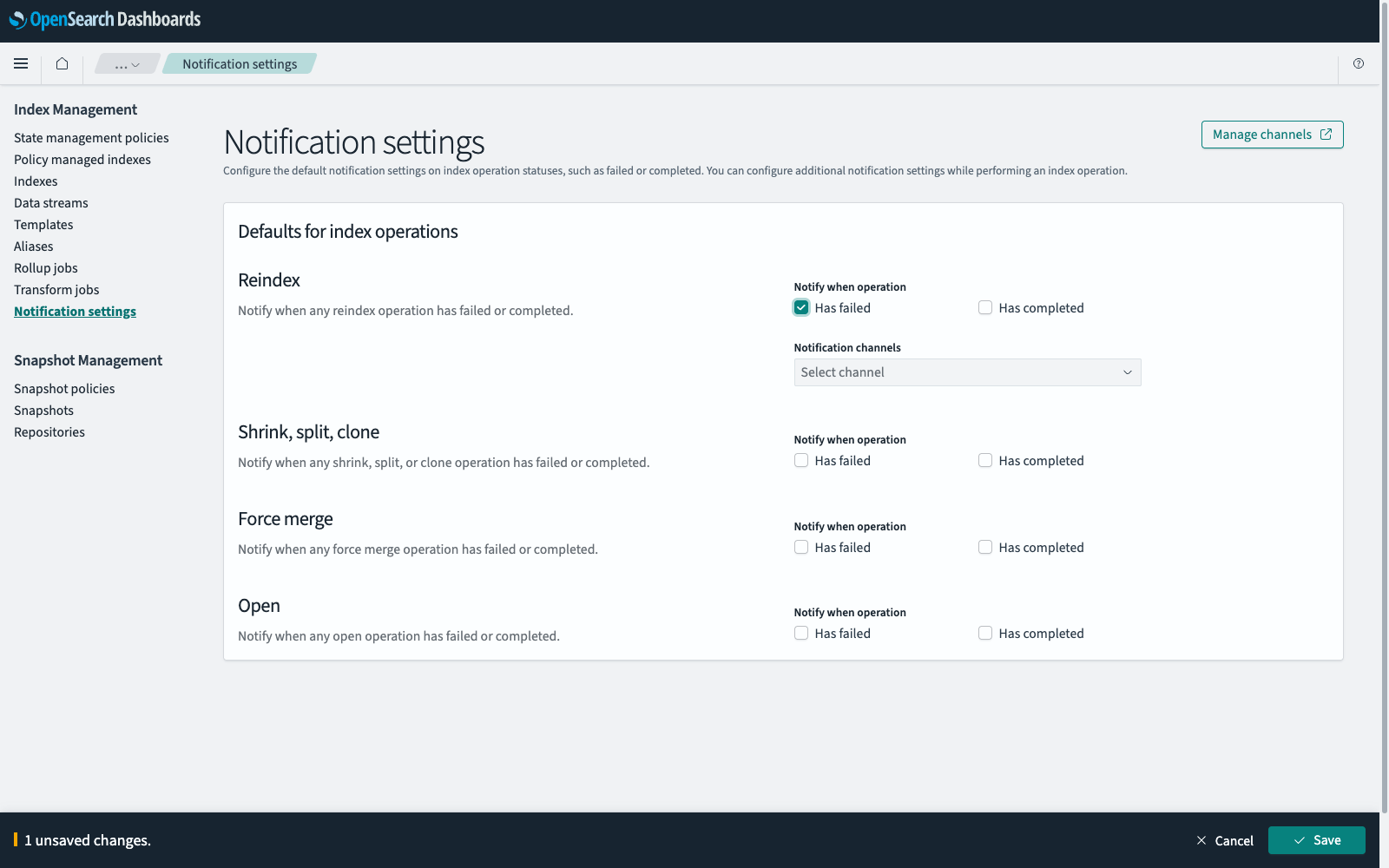
To navigate to the Index Management page, go to Management > Index Management on the top menu. Select Notification settings to set the defaults for the operations that support notifications, as shown in the following image.
Creating a notification channel
A notification setting needs at least one channel to deliver to:
- In Index Management, select Notification settings, and then select Manage channels. The Channels page opens in a separate window.
- Select Create channel.
- Enter a name for the channel and, optionally, a description.
- In Configurations, select a Channel type. The settings that follow depend on the type: an email channel asks for a sender type, a sender, and recipients, while a Slack channel asks for a webhook URL.
- Enter the settings for the channel type.
- Optionally, select Send test message to confirm that the channel works.
- Select Create.
Setting defaults for all operations
Default settings apply to every reindex, shrink, split, clone, force merge, and open operation in the cluster:
- In Index Management, select Notification settings.
- In Defaults for index operations, select Has failed, Has completed, or both for each of reindex, shrink, split, clone, force merge, and open.
- For each operation that you selected a notification for, select one or more channels from Notification channels.
- Select Save.
Viewing or changing default notification settings requires permission to read them.
Sending additional notifications
Reindex, split, shrink, and force merge operations can carry their own notification settings in addition to the defaults:
- In Index Management, select Indexes.
- Select the index that the operation applies to.
- Select Actions, and then select the operation, such as Reindex.
- Expand Advanced settings. The Notifications section lists the defaults currently in effect.
- Select Send additional notifications.
- Select Has failed / timed out, Has completed, or both.
- Select a channel from Notification channels.
- Select the button for the operation, such as Reindex.