You're viewing version 3.8 of the OpenSearch documentation. This version is no longer maintained. For the latest version, see the current documentation. For information about OpenSearch version maintenance, see Release Schedule and Maintenance Policy.
Reindexing data
Some changes cannot be made to an index in place. You cannot change the type of an existing field, remove a field from a mapping, or change the number of primary shards without rebuilding the index. Reindexing copies documents from one or more source indexes into a destination index that has the configuration you want, so you can make these changes without exporting your data and loading it again.
Reindexing is also how you combine several indexes into one, split one index by a query, apply an ingest pipeline to documents that are already stored, or move data between clusters.
Reindexing reads each document from the _source field of the source index and indexes it into the destination index using the destination’s mappings and settings. This has two consequences:
- The source index must have
_sourceenabled. Anystored_fieldsconfiguration is ignored. - The destination index does not inherit the mappings and settings of the source index. If it does not exist, OpenSearch creates it with dynamic mappings inferred from the first documents copied, which is rarely what you want. Create it with the mappings and settings you need before you start.
Reindexing a large index is expensive in I/O and can slow down searches on the cluster. Set number_of_replicas to 0 on the destination index while the copy runs and restore it afterward, and consider throttling the operation. For more information, see Performance optimization.
Reindexing an index
In its simplest form, a reindex request names a source and a destination. Create the source index and add a document to it:
POST my-source-index/_doc?refresh=true
{
  "title": "Spirited Away"
}
Then copy it into the destination index:
POST _reindex
{
  "source": {
    "index": "my-source-index"
  },
  "dest": {
    "index": "my-destination-index"
  }
}
By default, the request runs to completion and returns a summary of the documents copied. To run it in the background, set wait_for_completion to false; the response contains a task ID that you can pass to the Tasks API to check on progress, or use to set up a notification.
The Reindex Documents API documents the rest of what a reindex request can do, including the following:
- Copying a subset of documents selected by a query
- Combining several source indexes into one destination
- Reindexing from a remote cluster
- Skipping documents that already exist in the destination
- Transforming documents during the copy with a script or an ingest pipeline
- Slicing the operation to run in parallel
Reindexing data in OpenSearch Dashboards
To navigate to the Index Management page, go to Management > Index Management on the top menu.
The following image shows the reindex form.
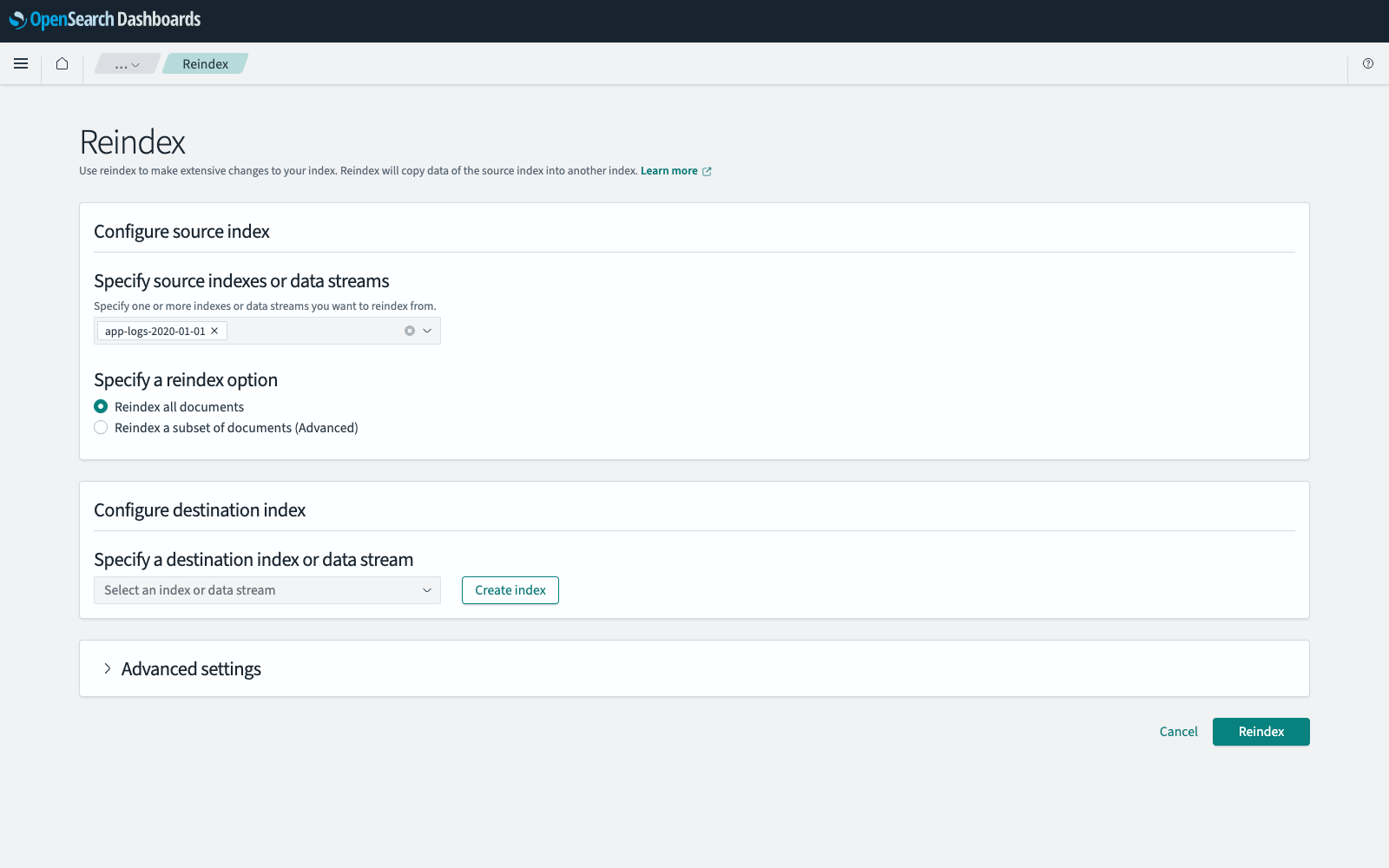
To reindex an index, follow these steps:
- Optionally, create the destination index first. You can also create it during the following steps and import the settings and mappings from the source index.
- In Index Management, select Indexes.
- Select Actions, and then select Reindex.
- In Configure source index, select the indexes, aliases, or data streams to copy from.
- In Specify a reindex option, select Reindex all documents or Reindex a subset of documents.
-
If you are reindexing a subset, enter a query in Query expression to select the documents to copy. For example, the following query selects the documents with a
timestampon or after January 1, 2024:{ "bool": { "filter": [ { "range": { "timestamp": { "gte": "2024-01-01" }}} ] } } - In Configure destination index, select the destination. To create it here, select Create index, enter a name, optionally select aliases, and then select Import settings and mappings and select the source index to copy its configuration. You can add fields to the destination in Index mapping.
-
Optionally, expand Advanced settings and set any of the following options:
- To skip the documents whose IDs already exist in the destination, select Reindex only unique documents.
- To keep a version conflict from stopping the operation, select Ignore conflicts during reindexing in Version conflicts.
- To split the operation into parallel subtasks, select Slice this reindexing operation.
- To apply an ingest pipeline to each document before it is written, select the pipeline in Transform with ingest pipeline.
- To be notified about the outcome, select Send additional notifications. For more information, see Sending additional notifications.
- Select Reindex.
Reindexing can take a long time. To follow its progress, see Checking the status of long-running operations.
The source and destination must be different. Reindexing an index into itself is rejected; to update documents in place, use Update By Query.