Pipelines
Pipelines are critical components that streamline the process of acquiring, transforming, and loading data from various sources into a centralized data repository or processing system. The following diagram illustrates how OpenSearch Data Prepper ingests data into OpenSearch.
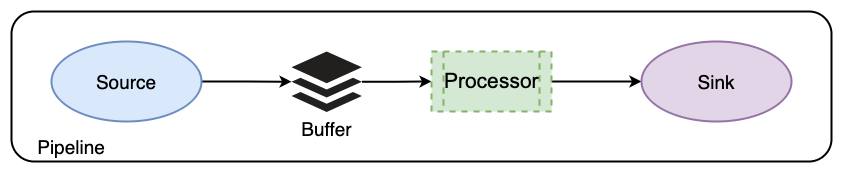
Configuring Data Prepper pipelines
Pipelines are defined in the configuration YAML file. Starting with Data Prepper 2.0, you can define pipelines across multiple YAML configuration files, with each file containing the configuration for one or more pipelines. This gives you flexibility to organize and chain together complex pipeline configurations. To ensure proper loading of your pipeline configurations, place the YAML configuration files in the pipelines folder in your application’s home directory, for example, /usr/share/data-prepper.
The following is an example configuration:
simple-sample-pipeline:
  workers: 2 # the number of workers
  delay: 5000 # in milliseconds, how long workers wait between read attempts
  source:
    random:
  buffer:
    bounded_blocking:
      buffer_size: 1024 # max number of records the buffer accepts
      batch_size: 256 # max number of records the buffer drains after each read
  processor:
    - string_converter:
        upper_case: true
  sink:
    - stdout:
Pipeline components
The following table describes the components used in the given pipeline.
| Option | Required | Type | Description |
|---|---|---|---|
workers | No | Integer | The number of application threads. Set to the number of CPU cores. Default is 1. |
delay | No | Integer | The number of milliseconds that workers wait between buffer read attempts. Default is 3000. |
source | Yes | String list | random generates random numbers by using a Universally Unique Identifier (UUID) generator. |
bounded_blocking | No | String list | The default buffer in Data Prepper. |
processor | No | String list | A string_converter with an upper_case processor that converts strings to uppercase. |
sink | Yes | stdout outputs to standard output. |
Pipeline concepts
The following are fundamental concepts relating to Data Prepper pipelines.
End-to-end acknowledgments
Data Prepper ensures reliable and durable data delivery from sources to sinks through end-to-end (E2E) acknowledgments. The E2E acknowledgment process begins at the source, which monitors event batches within pipelines and waits for a positive acknowledgment upon successful delivery to the sinks. In pipelines with multiple sinks, including nested Data Prepper pipelines, the E2E acknowledgment is sent when events reach the final sink in the pipeline chain. Conversely, the source sends a negative acknowledgment if an event cannot be delivered to a sink for any reason.
If a pipeline component fails to process and send an event, then the source receives no acknowledgment. In the case of a failure, the pipeline’s source times out, allowing you to take necessary actions, such as rerunning the pipeline or logging the failure.
Conditional routing
Pipelines also support conditional routing, which enables the routing of events to different sinks based on specific conditions. To add conditional routing, specify a list of named routes using the route component and assign specific routes to sinks using the routes property. Any sink with the routes property only accepts events matching at least one of the routing conditions.
In the following pipeline, routes are defined at the pipeline level under route. The route uses Data Prepper expressions to define the condition. Two named routes are declared:
-
errors: /level == "ERROR" -
slow_requests: /latency_ms != null and /latency_ms >= 1000
Each OpenSearch sink can opt in to one or more routes using the routes: setting. Events that satisfy a route’s condition are delivered to the sinks that reference that route. For example, the first sink receives events matching errors, and the second sink receives events matching slow_requests.
By default, any sink without a routes: list receives all events, regardless of whether they matched other routes. In the following example, the third sink has no routes: setting, so it receives all events, including those already routed to the first two sinks:
routes-demo-pipeline:
  source:
    http:
      path: /logs
      ssl: false

  route:
    - errors: '/level == "ERROR"'
    - slow_requests: '/latency_ms != null and /latency_ms >= 1000'

  sink:
    # 1) Only events matching the "errors" route
    - opensearch:
        hosts: ["https://opensearch:9200"]
        insecure: true
        username: admin
        password: admin_pass
        index_type: custom
        index: routed-errors-%{yyyy.MM.dd}
        routes: [errors]

    # 2) Only events matching the "slow_requests" route
    - opensearch:
        hosts: ["https://opensearch:9200"]
        insecure: true
        username: admin
        password: admin_pass
        index_type: custom
        index: routed-slow-%{yyyy.MM.dd}
        routes: [slow_requests]

    # 3) All events
    - opensearch:
        hosts: ["https://opensearch:9200"]
        insecure: true
        username: admin
        password: admin_pass
        index_type: custom
        index: routed-other-%{yyyy.MM.dd}
You can test this pipeline using the following command:
curl -sS -X POST "http://localhost:2021/logs" \
  -H "Content-Type: application/json" \
  -d '[
    {"level":"ERROR","message":"DB connection failed","latency_ms":120},
    {"level":"INFO","message":"GET /api/items","latency_ms":1500},
    {"level":"INFO","message":"health check ok","latency_ms":42}
  ]'
The documents are stored in the corresponding indexes:
health status index                        uuid                   pri rep docs.count docs.deleted store.size pri.store.size
...
green open   routed-other-2025.10.14      IBZTXO3ySBGky0tIHRaRmg   1   1          3            0      5.4kb          5.4kb
green open   routed-slow-2025.10.14       J-hzZ9m8RkWvpMKC_oQLVQ   1   1          1            0        5kb            5kb
green open   routed-errors-2025.10.14     v3r7JzPfQVOS8dWOBF1o2w   1   1          1            0        5kb            5kb
...
DLQ pipeline
The dead-letter queue (DLQ) pipeline is a dedicated pipeline that captures events Data Prepper cannot process at any stage, including the source, processor, buffer, or sink. You define this pipeline using the reserved name dlq_pipeline, and it must be configured without a source.
The pipeline can include optional processors and routes, but it must contain at least one sink used to send failed events to an external destination. Like other pipelines, the DLQ pipeline can use routes and multiple sinks to direct different events to different destinations.
The following is an example configuration:
dlq_pipeline:
  processor:
    - uppercase_string:
        with_keys:
          - "uppercaseField"
  sink:
    - opensearch:
Next steps
- See Common uses cases for example configurations.