Monitoring search quality
Introduced 3.4
Search quality is not static. Even if your ranking algorithms remain unchanged, the indexed data evolves, signals such as popularity and recency fluctuate, and user queries shift over time.
To detect and prevent unintended changes in relevance, you should monitor search quality on an ongoing basis. You can configure a cron schedule to run a search evaluation experiment at regular intervals.
Each job can have only one schedule. To modify the schedule, delete the existing schedule and create a new one. Deleting a schedule also removes its associated historical data.
Scheduling a search evaluation using Search Relevance Workbench
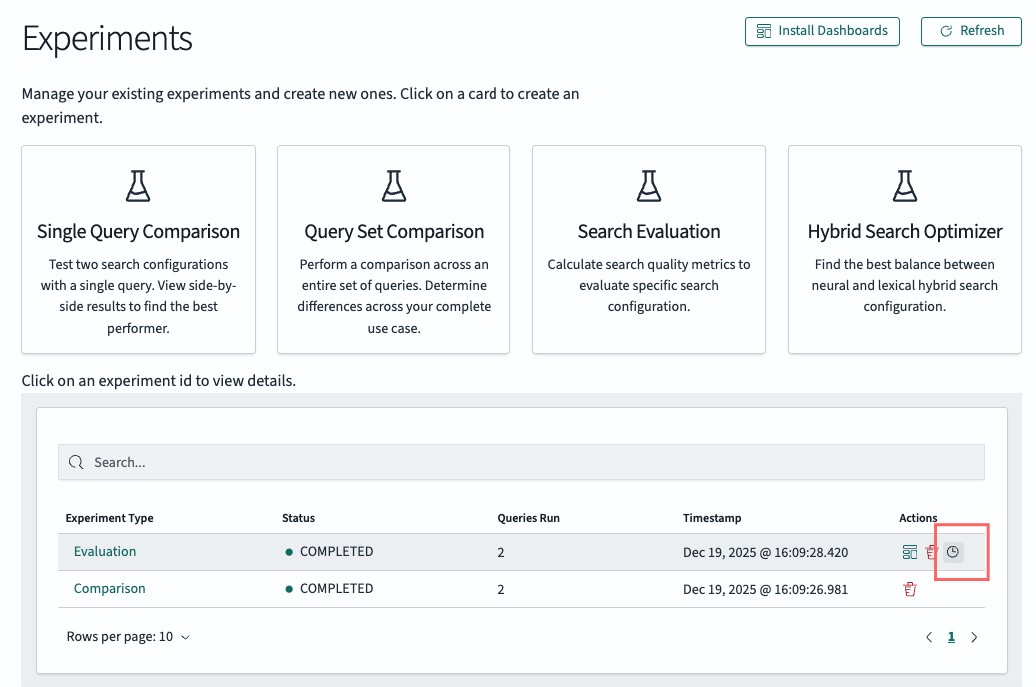
After you successfully run a search evaluation for the first time, a clock icon appears that allows you to schedule the experiment, as shown in the following image.
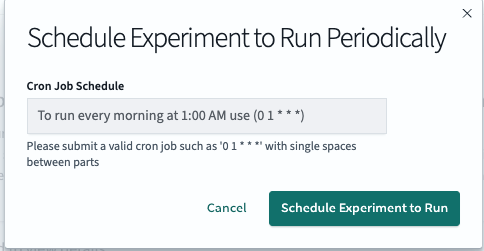
On the scheduling page, configure how frequently you want the experiment to run, as shown in the following image.
Evaluating search quality
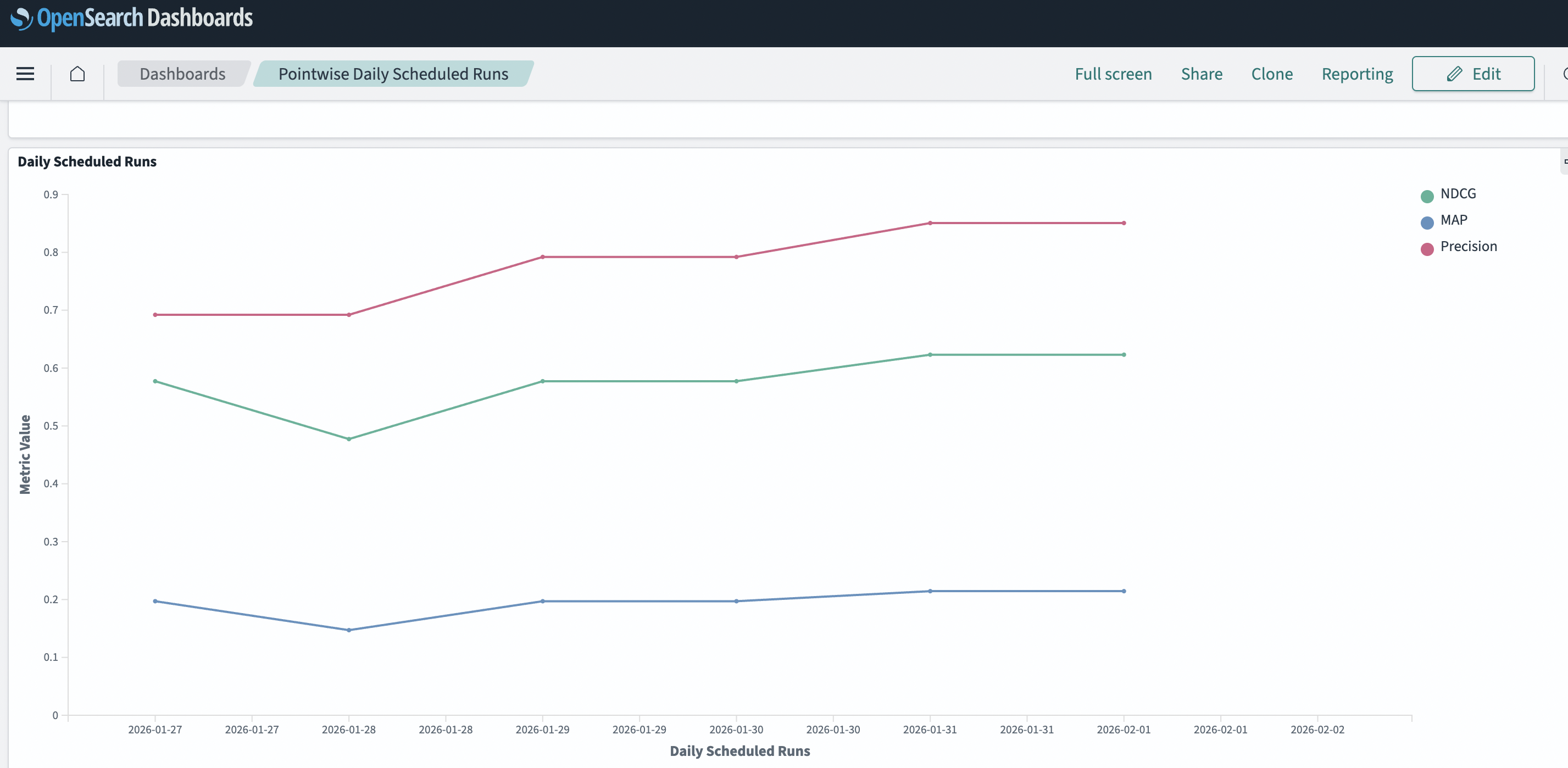
Once an experiment is scheduled, a new dashboard icon lets you monitor the search results over time. Because the dashboard evaluates results daily, it may take up to 24 hours for the data to populate and display meaningful insights.
Scheduling a search evaluation using the API
You can create regularly scheduled experiments using the API. The experiment you are scheduling must already exist.
Endpoint
POST _plugins/_search_relevance/experiments/schedule
Request body fields
The following table lists the available input parameters.
| Field | Data type | Description |
|---|---|---|
experimentId | String | The experiment ID to rerun. |
cronExpression | String | A cron schedule for running the evaluation in UTC. |
Example request
The following request schedules the experiment to run every night at 1 AM:
POST _plugins/_search_relevance/experiments/schedule
{
  "experimentId": "6282afa6-fa14-49c8-a627-ac1d5204d357",
  "cronExpression": "0 1 * * *"
}
Managing scheduled experiments
You can retrieve or delete scheduled experiments using the following APIs.
Retrieve scheduled experiments
This API retrieves the available scheduled experiments.
Endpoints
GET _plugins/_search_relevance/experiments/schedule
GET _plugins/_search_relevance/experiments/schedule/<experiment_id>
Path parameters
The following table lists the available path parameters.
| Parameter | Data type | Description |
|---|---|---|
experiment_id | String | The ID of the scheduled experiment to retrieve. If not provided, retrieves all scheduled experiments. |
Example request
``json GET _plugins/_search_relevance/experiments/schedule/6282afa6-fa14-49c8-a627-ac1d5204d357
<label hidden class="copy-curl-label">copy</label>

#### Example response

```json
{
  "took": 17,
  "timed_out": false,
  "_shards": {
    "total": 1,
    "successful": 1,
    "skipped": 0,
    "failed": 0
  },
  "hits": {
    "total": {
      "value": 2,
      "relation": "eq"
    },
    "max_score": null,
    "hits": [
      {
        "_index": ".search-relevance-scheduled-experiment-jobs",
        "_id": "6282afa6-fa14-49c8-a627-ac1d5204d357",
        "_score": null,
        "_source": {
          "id": "6282afa6-fa14-49c8-a627-ac1d5204d357",
          "enabled": true,
          "schedule": {
            "cron": {
              "expression": "0 0 * * *",
              "timezone": "America/Los_Angeles"
            }
          },
          "enabledTime": 1758320475601,
          "lastUpdateTime": 1758320475601,
          "timestamp": "2025-09-19T00:00:00.602Z"
        },
        "sort": [
          "2025-09-19T00:00:00.602Z"
        ]
      }
    ]
  }
}
Delete a scheduled experiment
You can delete a scheduled experiment using the scheduled experiment ID.
Endpoint
DELETE _plugins/_search_relevance/experiments/schedule/<experiment_id>
Path parameters
The following table lists the available path parameters.
| Parameter | Data type | Description |
|---|---|---|
experiment_id | String | The ID of the scheduled experiment to delete. |
Example request
DELETE _plugins/_search_relevance/experiments/schedule/6282afa6-fa14-49c8-a627-ac1d5204d357
Example response
{
  "_index": ".search-relevance-scheduled-experiment-jobs",
  "_id": "6282afa6-fa14-49c8-a627-ac1d5204d357",
  "_version": 2,
  "result": "deleted",
  "forced_refresh": true,
  "_shards": {
    "total": 2,
    "successful": 1,
    "failed": 0
  },
  "_seq_no": 17,
  "_primary_term": 1
}