Optimizing hybrid search
A key challenge of using hybrid search in OpenSearch is combining results from lexical and vector-based search effectively. OpenSearch provides different techniques and various parameters you can experiment with to find the best setup for your application. What works best, however, depends heavily on your data, user behavior, and application domain—there is no one-size-fits-all solution.
Search Relevance Workbench helps you systematically find the ideal set of parameters for your needs.
Requirements
Internally, optimizing hybrid search involves running multiple search quality evaluation experiments. For these experiments, you need a query set, judgments, and a search configuration. Search Relevance Workbench currently supports hybrid search optimization with exactly two query clauses. While hybrid search typically combines vector and lexical queries, you can run hybrid search optimization with two lexical query clauses:
PUT _plugins/_search_relevance/search_configurations
{
  "name": "hybrid_query_lexical",
  "query": "{\"query\":{\"hybrid\":{\"queries\":[{\"match\":{\"title\":\"%SearchText%\"}},{\"match\":{\"category\":\"%SearchText%\"}}]}}}",
  "index": "ecommerce"
}
Hybrid search optimization is most valuable when combining lexical and vector-based search results. For optimal results, configure your hybrid search query with two clauses: one textual query clause and one neural query clause. You don’t need to configure the search pipeline to combine results because the hybrid search optimization process handles this automatically. The following is an example of a search configuration suitable for hybrid search optimization:
PUT _plugins/_search_relevance/search_configurations
{
  "name": "hybrid_query_text",
  "query": "{\"query\":{\"hybrid\":{\"queries\":[{\"multi_match\":{\"query\":\"%SearchText%\",\"fields\":[\"id\",\"title\",\"category\",\"bullets\",\"description\",\"attrs.Brand\\\",\"attrs.Color\"]}},{\"neural\":{\"title_embedding\":{\"query_text\":\"%SearchText%\",\"k\":100,\"model_id\":\"lRFFb5cBHkapxdNcFFkP\"}}}]}},\"size\":10}",
  "index": "ecommerce"
}
The model ID specified in the query must be a valid model ID for a model deployed in OpenSearch. The target index must contain the field used for neural search embeddings (in this example, title_embedding).
For an end-to-end example, see the search-relevance repository.
Running a hybrid search optimization experiment
You can create a hybrid search optimization experiment by calling the Search Relevance Workbench experiments endpoint.
Endpoint
PUT _plugins/_search_relevance/experiments
Example request
PUT _plugins/_search_relevance/experiments
{
  "querySetId": "b16a6a2b-ed6e-49af-bb2b-fc739dcf24e6",
  "searchConfigurationList": ["508a8812-27c9-45fc-999a-05f859f9b210"],
  "judgmentList": ["1b944d40-e95a-43f6-9e92-9ce00f70de79"],
  "size": 10,
  "type": "HYBRID_OPTIMIZER"
}
Example response
{
  "experiment_id": "0f4eff05-fd14-4e85-ab5e-e8e484cdac73",
  "experiment_result": "CREATED"
}
Experimentation process
The hybrid search optimization experiment evaluates all combinations of the following parameter variants for each query in the query set and scores the results against the judgment list:
- Score-based variants:
- Normalization techniques:
l2,min_max, andz_score. Thez_scoretechnique can be combined only witharithmetic_meanbecause of a normalization processor restriction. - Combination techniques:
arithmetic_mean,harmonic_mean, andgeometric_mean. - Lexical and neural search weights ranging from
0.0to1.0, in0.1increments.
- Normalization techniques:
- Rank-based variants:
- The
rrf(Reciprocal Rank Fusion (RRF)) combination technique, evaluated usingrank_constantvalues of1,5,10,20, and60. RRF variants use equal weights in all subqueries.
- The
Evaluating the results
The results for each evaluation are stored. You can view the results in OpenSearch Dashboards by selecting the corresponding experiment in the overview of past experiments, as shown in the following image.

All executed queries and their calculated search metrics are displayed, as shown in the following image.
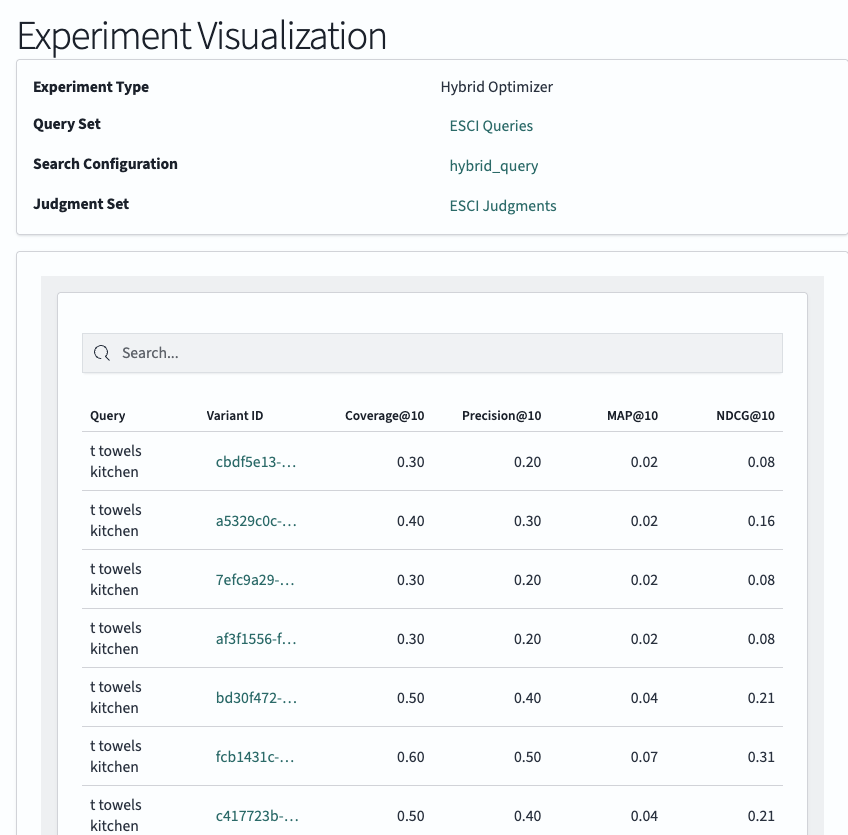
To view query variants, select one of the queries, as shown in the following image.
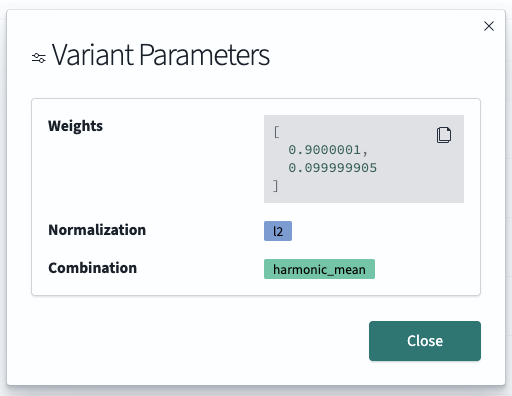
You can also retrieve this information by using the following SQL search statement and providing your experimentId:
POST _plugins/_sql
{
  "query": "SELECT ev.parameters.normalization, ev.parameters.combination, ev.parameters.weights, ev.results.evaluationResultId, ev.experimentId, er.id, er.metrics, er.searchText FROM search-relevance-experiment-variant ev JOIN search-relevance-evaluation-result er ON ev.results.evaluationResultId = er.id WHERE ev.experimentId = '814e2378-901c-4273-9873-9b758a33089d'"
}
To review these results visually, see Exploring search evaluation results.