Build your own chatbot
Sometimes a large language model (LLM) cannot answer a question right away. For example, an LLM can’t tell you how many errors there are in your log index for last week because its knowledge base does not contain your proprietary data. In this case, you need to provide additional information to an LLM in a subsequent call. You can use an agent to solve such complex problems. The agent can run tools to obtain more information from configured data sources and send the additional information to the LLM as context.
This tutorial describes how to build your own chatbot in OpenSearch using a conversational agent. For more information about agents, see Agents and tools.
Replace the placeholders starting with the prefix your_ with your own values.
Prerequisite
Log in to the OpenSearch Dashboards home page, select Add sample data, and add the Sample eCommerce orders data.
Step 1: Configure a knowledge base
Meet the prerequisite and follow Step 1 of the RAG with a conversational flow agent tutorial to configure the test_population_data knowledge base index, which contains US city population data.
Create an ingest pipeline:
PUT /_ingest/pipeline/test_stock_price_data_pipeline
{
  "description": "text embedding pipeline",
  "processors": [
    {
      "text_embedding": {
        "model_id": "your_text_embedding_model_id",
        "field_map": {
          "stock_price_history": "stock_price_history_embedding"
        }
      }
    }
  ]
}
Create the test_stock_price_data index, which contains historical stock price data:
PUT test_stock_price_data
{
  "mappings": {
    "properties": {
      "stock_price_history": {
        "type": "text"
      },
      "stock_price_history_embedding": {
        "type": "knn_vector",
        "dimension": 384,
        "space_type": "cosinesimil"
      }
    }
  },
  "settings": {
    "index": {
      "default_pipeline": "test_stock_price_data_pipeline",
      "knn": "true"
    }
  }
}
Ingest data into the index:
POST _bulk
{"index": {"_index": "test_stock_price_data"}}
{"stock_price_history": "This is the historical montly stock price record for Amazon.com, Inc. (AMZN) with CSV format.\nDate,Open,High,Low,Close,Adj Close,Volume\n2023-03-01,93.870003,103.489998,88.120003,103.290001,103.290001,1349240300\n2023-04-01,102.300003,110.860001,97.709999,105.449997,105.449997,1224083600\n2023-05-01,104.949997,122.919998,101.150002,120.580002,120.580002,1432891600\n2023-06-01,120.690002,131.490005,119.930000,130.360001,130.360001,1242648800\n2023-07-01,130.820007,136.649994,125.919998,133.679993,133.679993,1058754800\n2023-08-01,133.550003,143.630005,126.410004,138.009995,138.009995,1210426200\n2023-09-01,139.460007,145.860001,123.040001,127.120003,127.120003,1120271900\n2023-10-01,127.279999,134.479996,118.349998,133.089996,133.089996,1224564700\n2023-11-01,133.960007,149.259995,133.710007,146.089996,146.089996,1025986900\n2023-12-01,146.000000,155.630005,142.809998,151.940002,151.940002,931128600\n2024-01-01,151.539993,161.729996,144.050003,155.199997,155.199997,953344900\n2024-02-01,155.869995,175.000000,155.619995,174.449997,174.449997,437720800\n"}
{"index": {"_index": "test_stock_price_data"}}
{"stock_price_history": "This is the historical montly stock price record for Apple Inc. (AAPL) with CSV format.\nDate,Open,High,Low,Close,Adj Close,Volume\n2023-03-01,146.830002,165.000000,143.899994,164.899994,164.024475,1520266600\n2023-04-01,164.270004,169.850006,159.779999,169.679993,168.779099,969709700\n2023-05-01,169.279999,179.350006,164.309998,177.250000,176.308914,1275155500\n2023-06-01,177.699997,194.479996,176.929993,193.970001,193.207016,1297101100\n2023-07-01,193.779999,198.229996,186.600006,196.449997,195.677261,996066400\n2023-08-01,196.240005,196.729996,171.960007,187.869995,187.130997,1322439400\n2023-09-01,189.490005,189.979996,167.619995,171.210007,170.766846,1337586600\n2023-10-01,171.220001,182.339996,165.669998,170.770004,170.327972,1172719600\n2023-11-01,171.000000,192.929993,170.119995,189.949997,189.458313,1099586100\n2023-12-01,190.330002,199.619995,187.449997,192.529999,192.284637,1062774800\n2024-01-01,187.149994,196.380005,180.169998,184.399994,184.164993,1187219300\n2024-02-01,183.990005,191.050003,179.250000,188.850006,188.609329,420063900\n"}
{"index": {"_index": "test_stock_price_data"}}
{"stock_price_history": "This is the historical montly stock price record for NVIDIA Corporation (NVDA) with CSV format.\nDate,Open,High,Low,Close,Adj Close,Volume\n2023-03-01,231.919998,278.339996,222.970001,277.769989,277.646820,1126373100\n2023-04-01,275.089996,281.100006,262.200012,277.489990,277.414032,743592100\n2023-05-01,278.399994,419.380005,272.399994,378.339996,378.236420,1169636000\n2023-06-01,384.890015,439.899994,373.559998,423.019989,422.904175,1052209200\n2023-07-01,425.170013,480.880005,413.459991,467.290009,467.210449,870489500\n2023-08-01,464.600006,502.660004,403.109985,493.549988,493.465942,1363143600\n2023-09-01,497.619995,498.000000,409.799988,434.989990,434.915924,857510100\n2023-10-01,440.299988,476.089996,392.299988,407.799988,407.764130,1013917700\n2023-11-01,408.839996,505.480011,408.690002,467.700012,467.658905,914386300\n2023-12-01,465.250000,504.329987,450.100006,495.220001,495.176453,740951700\n2024-01-01,492.440002,634.929993,473.200012,615.270020,615.270020,970385300\n2024-02-01,621.000000,721.849976,616.500000,721.330017,721.330017,355346500\n"}
{"index": {"_index": "test_stock_price_data"}}
{"stock_price_history": "This is the historical montly stock price record for Meta Platforms, Inc. (META) with CSV format.\n\nDate,Open,High,Low,Close,Adj Close,Volume\n2023-03-01,174.589996,212.169998,171.429993,211.940002,211.940002,690053000\n2023-04-01,208.839996,241.690002,207.130005,240.320007,240.320007,446687900\n2023-05-01,238.619995,268.649994,229.850006,264.720001,264.720001,486968500\n2023-06-01,265.899994,289.790009,258.880005,286.980011,286.980011,480979900\n2023-07-01,286.700012,326.200012,284.850006,318.600006,318.600006,624605100\n2023-08-01,317.540009,324.140015,274.380005,295.890015,295.890015,423147800\n2023-09-01,299.369995,312.869995,286.790009,300.209991,300.209991,406686600\n2023-10-01,302.739990,330.540009,279.399994,301.269989,301.269989,511307900\n2023-11-01,301.850006,342.920013,301.850006,327.149994,327.149994,329270500\n2023-12-01,325.480011,361.899994,313.660004,353.959991,353.959991,332813800\n2024-01-01,351.320007,406.359985,340.010010,390.140015,390.140015,347020200\n2024-02-01,393.940002,485.959991,393.049988,473.279999,473.279999,294260900\n"}
{"index": {"_index": "test_stock_price_data"}}
{"stock_price_history": "This is the historical montly stock price record for Microsoft Corporation (MSFT) with CSV format.\n\nDate,Open,High,Low,Close,Adj Close,Volume\n2023-03-01,250.759995,289.269989,245.610001,288.299988,285.953064,747635000\n2023-04-01,286.519989,308.929993,275.369995,307.260010,304.758759,551497100\n2023-05-01,306.970001,335.940002,303.399994,328.390015,325.716766,600807200\n2023-06-01,325.929993,351.470001,322.500000,340.540009,338.506226,547588700\n2023-07-01,339.190002,366.779999,327.000000,335.920013,333.913818,666764400\n2023-08-01,335.190002,338.540009,311.549988,327.760010,325.802582,479456700\n2023-09-01,331.309998,340.859985,309.450012,315.750000,314.528809,416680700\n2023-10-01,316.279999,346.200012,311.209991,338.109985,336.802307,540907000\n2023-11-01,339.790009,384.299988,339.649994,378.910004,377.444519,563880300\n2023-12-01,376.760010,378.160004,362.899994,376.040009,375.345886,522003700\n2024-01-01,373.859985,415.320007,366.500000,397.579987,396.846130,528399000\n2024-02-01,401.829987,420.820007,401.799988,409.489990,408.734131,237639700\n"}
{"index": {"_index": "test_stock_price_data"}}
{"stock_price_history": "This is the historical montly stock price record for Alphabet Inc. (GOOG) with CSV format.\n\nDate,Open,High,Low,Close,Adj Close,Volume\n2023-03-01,90.160004,107.510002,89.769997,104.000000,104.000000,725477100\n2023-04-01,102.669998,109.629997,102.379997,108.220001,108.220001,461670700\n2023-05-01,107.720001,127.050003,104.500000,123.370003,123.370003,620317400\n2023-06-01,123.500000,129.550003,116.910004,120.970001,120.970001,521386300\n2023-07-01,120.320000,134.070007,115.830002,133.110001,133.110001,525456900\n2023-08-01,130.854996,138.399994,127.000000,137.350006,137.350006,463482000\n2023-09-01,138.429993,139.929993,128.190002,131.850006,131.850006,389593900\n2023-10-01,132.154999,142.380005,121.459999,125.300003,125.300003,514877100\n2023-11-01,125.339996,141.100006,124.925003,133.919998,133.919998,405635900\n2023-12-01,133.320007,143.945007,129.399994,140.929993,140.929993,482059400\n2024-01-01,139.600006,155.199997,136.850006,141.800003,141.800003,428771200\n2024-02-01,143.690002,150.695007,138.169998,147.139999,147.139999,231934100\n"}
Step 2: Prepare an LLM
This tutorial uses the Amazon Bedrock Claude model. You can also use other LLMs. For more information, see Connecting to externally hosted models.
Create a connector for the model:
POST /_plugins/_ml/connectors/_create
{
  "name": "Bedrock Claude Sonnet 4.6",
  "description": "The connector to BedRock service for claude model",
  "version": 1,
  "protocol": "aws_sigv4",
  "parameters": {
    "region": "us-east-1",
    "service_name": "bedrock",
    "model": "us.anthropic.claude-sonnet-4-6",
    "response_filter": "$.output.message.content[0].text"
  },
  "credential": {
    "access_key": "your_aws_access_key",
    "secret_key": "your_aws_secret_key",
    "session_token": "your_aws_session_token"
  },
  "actions": [{
    "action_type": "predict",
    "method": "POST",
    "url": "https://bedrock-runtime.${parameters.region}.amazonaws.com/model/${parameters.model}/converse",
    "headers": { "content-type": "application/json" },
    "request_body": "{\"system\": [{\"text\": \"${parameters.system_prompt:-You are a helpful assistant.}\"}], \"messages\": [${parameters._chat_history:-}{\"role\":\"user\",\"content\":[{\"text\":\"${parameters.prompt:-}\"}]}${parameters._interactions:-}]${parameters.tool_configs:-}}"
  }]
}
Note the connector ID; you’ll use it to register the model.
Register the model:
POST /_plugins/_ml/models/_register
{
    "name": "Bedrock Claude Sonnet 4.6 model",
    "function_name": "remote",
    "description": "Bedrock Claude Sonnet 4.6 model",
    "connector_id": "your_connector_id"
}
Note the LLM model ID; you’ll use it in the following steps.
Deploy the model:
POST /_plugins/_ml/models/your_LLM_model_id/_deploy
Test the model:
POST /_plugins/_ml/models/your_LLM_model_id/_predict
{
  "parameters": {
    "prompt": "how are you?"
  }
}
Step 3: Create an agent with the default prompt
Next, create and test an agent.
Create an agent
Create an agent of the conversational type.
The agent is configured with the following information:
- Meta information:
name,type,description. - LLM information: The agent uses an LLM to reason and select the next step, including choosing an appropriate tool and preparing the tool input.
- Tools: A tool is a function that can be executed by the agent. Each tool can define its own
name,description, andparameters. - Memory: Stores chat messages. OpenSearch supports one memory type:
conversation_index.
The agent contains the following parameters:
conversational: This agent type has a built-in prompt. To override it with your own prompt, see Step 4.app_type: Specify this parameter for reference purposes in order to differentiate between multiple agents.llm: Defines the LLM configuration:"max_iteration": 5: The agent runs the LLM a maximum of five times."response_filter": "$": Passes the full model response to the agent so that the agent can read the tool calls in it. This setting overrides the connector’sresponse_filter, which the Predict API and thePPLTooluse to obtain only the answer text."prompt": "${parameters.question}": Sends the user question to the LLM as the user message."message_history_limit": 5: The agent retrieves a maximum of the five most recent historical messages and adds them to the LLM context. Set this parameter to0to omit message history in the context.disable_trace: Iftrue, then the agent does not store trace data in memory. Trace data is included in each message and provides a detailed recount of steps performed while generating the message.
memory: Defines how to store messages. OpenSearch only supports theconversation_indexmemory, which stores messages in a memory index.parameters: Defines agent parameters:"_llm_interface": "bedrock/converse/claude": Uses the tool calling (function calling) interface of the Amazon Bedrock Converse API for Claude models. The agent sends the tool definitions to the LLM in thetoolConfigfield of the request and reads the tool calls from the LLM response.
- Tools:
- An LLM will reason to decide which tool to run and will prepare the tool’s input.
- To include the tool’s output in the response, specify
"include_output_in_agent_response": true. In this tutorial, you will include thePPLTooloutput in the response (see the example response in Test the agent). - By default, the tool’s
nameis the same as the tool’stype, and each tool has a default description. You can override the tool’snameanddescription. - The LLM uses each tool’s input schema to prepare the tool input. If a tool doesn’t define a default input schema, provide one in
attributes.input_schema. In this tutorial, the request provides an input schema for thePPLTooland the anomaly detection and alerting search tools. - Each tool in the
toolslist must have a unique name. For example, the following demo agent defines two tools of theVectorDBTooltype with different names (population_data_knowledge_baseandstock_price_data_knowledge_base). Each tool has a custom description so that the LLM can easily understand what the tool does.
For more information about tools, see Tools.
This example request configures several sample tools in an agent. You can configure other tools that are relevant to your use case as needed.
Register the agent:
POST _plugins/_ml/agents/_register
{
  "name": "Chat Agent with Claude",
  "type": "conversational",
  "description": "this is a test agent",
  "app_type": "os_chat",
  "llm": {
    "model_id": "your_llm_model_id_from_step2",
    "parameters": {
      "max_iteration": 5,
      "response_filter": "$",
      "prompt": "${parameters.question}",
      "message_history_limit": 5,
      "disable_trace": false
    }
  },
  "memory": {
    "type": "conversation_index"
  },
  "parameters": {
    "_llm_interface": "bedrock/converse/claude"
  },
  "tools": [
    {
      "type": "PPLTool",
      "parameters": {
        "model_id": "your_llm_model_id_from_step2",
        "model_type": "CLAUDE",
        "execute": true
      },
      "attributes": {
        "input_schema": {
          "type": "object",
          "properties": {
            "question": {
              "type": "string",
              "description": "The natural language question to translate into PPL"
            },
            "index": {
              "type": "string",
              "description": "The index to query"
            }
          },
          "required": ["question", "index"]
        }
      },
      "include_output_in_agent_response": true
    },
    {
      "type": "VisualizationTool",
      "parameters": {
        "index": ".kibana"
      },
      "include_output_in_agent_response": true
    },
    {
      "type": "VectorDBTool",
      "name": "population_data_knowledge_base",
      "description": "This tool provide population data of US cities.",
      "parameters": {
        "input": "${parameters.question}",
        "index": "test_population_data",
        "source_field": [
          "population_description"
        ],
        "model_id": "your_embedding_model_id_from_step1",
        "embedding_field": "population_description_embedding",
        "doc_size": 3
      }
    },
    {
      "type": "VectorDBTool",
      "name": "stock_price_data_knowledge_base",
      "description": "This tool provide stock price data.",
      "parameters": {
        "input": "${parameters.question}",
        "index": "test_stock_price_data",
        "source_field": [
          "stock_price_history"
        ],
        "model_id": "your_embedding_model_id_from_step1",
        "embedding_field": "stock_price_history_embedding",
        "doc_size": 3
      }
    },
    {
      "type": "ListIndexTool",
      "description": "Use this tool to get OpenSearch index information: (health, status, index, uuid, primary count, replica count, docs.count, docs.deleted, store.size, primary.store.size). \nIt takes 2 optional arguments named `index` which is a comma-delimited list of one or more indices to get information from (default is an empty list meaning all indices), and `local` which means whether to return information from the local node only instead of the cluster manager node (default is false)."
    },
    {
      "type": "SearchAnomalyDetectorsTool",
      "attributes": {
        "input_schema": {
          "type": "object",
          "properties": {
            "detectorName": {
              "type": "string",
              "description": "The detector name"
            },
            "indices": {
              "type": "string",
              "description": "The index that the detector monitors"
            }
          }
        }
      }
    },
    {
      "type": "SearchAnomalyResultsTool",
      "attributes": {
        "input_schema": {
          "type": "object",
          "properties": {
            "detectorId": {
              "type": "string",
              "description": "The detector ID"
            }
          }
        }
      }
    },
    {
      "type": "SearchMonitorsTool",
      "attributes": {
        "input_schema": {
          "type": "object",
          "properties": {
            "monitorName": {
              "type": "string",
              "description": "The monitor name"
            },
            "indices": {
              "type": "string",
              "description": "The index that the monitor monitors"
            }
          }
        }
      }
    },
    {
      "type": "SearchAlertsTool"
    }
  ]
}
Note the agent ID; you’ll use it in the next step.
Test the agent
Note the following testing tips:
- You can view the detailed steps of an agent execution in one of the following ways:
- Enable verbose mode:
"verbose": true. - Call the Get Trace API:
GET _plugins/_ml/memory/message/your_message_id/traces.
- Enable verbose mode:
- An LLM may hallucinate. It may choose the wrong tool to solve your problem, especially when you have configured many tools. To avoid hallucinations, try the following options:
- Avoid configuring many tools in an agent.
- Provide a detailed tool description clarifying what the tool can do.
- Specify the tool to use in the LLM question, for example,
Can you use the PPLTool to query the opensearch_dashboards_sample_data_ecommerce index so it can calculate how many orders were placed last week?. - Specify the tool to use when executing an agent. For example, specify that only the
PPLToolandListIndexToolshould be used to process the current request.
Test the agent:
POST _plugins/_ml/agents/your_agent_id/_execute
{
    "parameters": {
    "question": "Can you query with index opensearch_dashboards_sample_data_ecommerce to calculate how many orders in last week?",
    "verbose": false,
    "selected_tools": ["PPLTool", "ListIndexTool"]
    }
}
Test the PPLTool
POST _plugins/_ml/agents/your_agent_id/_execute
{
  "parameters": {
    "question": "Can you query with index opensearch_dashboards_sample_data_ecommerce to calculate how many orders in last week?",
    "verbose": false
  }
}
Because you specified "include_output_in_agent_response": true for the PPLTool, the response contains PPLTool.output in the additional_info object:
{
  "inference_results": [
    {
      "output": [
        {
          "name": "memory_id",
          "result": "TkJwyI0Bn3OCesyvzuH9"
        },
        {
          "name": "parent_interaction_id",
          "result": "T0JwyI0Bn3OCesyvz-EI"
        },
        {
          "name": "response",
          "dataAsMap": {
            "response": "There were **3,536 orders** placed in the last week in the `opensearch_dashboards_sample_data_ecommerce` index.\n\nThe query filtered records where the `order_date` falls within the last 7 days and then counted the total number of matching orders.",
            "additional_info": {
              "PPLTool.output": [
                """{"ppl":"source=opensearch_dashboards_sample_data_ecommerce | where order_date > DATE_SUB(NOW(), INTERVAL 1 WEEK) | stats COUNT() AS count","executionResult":"{\n  \"schema\": [\n    {\n      \"name\": \"count\",\n      \"type\": \"bigint\"\n    }\n  ],\n  \"datarows\": [\n    [\n      3536\n    ]\n  ],\n  \"total\": 1,\n  \"size\": 1\n}"}"""
              ]
            }
          }
        }
      ]
    }
  ]
}
Obtain trace data:
GET _plugins/_ml/memory/message/T0JwyI0Bn3OCesyvz-EI/traces
Test the population_data_knowledge_base VectorDBTool
To view detailed steps, set verbose to true when executing the agent:
POST _plugins/_ml/agents/your_agent_id/_execute
{
  "parameters": {
    "question": "What's the population increase of Seattle from 2021 to 2023?",
    "verbose": true
  }
}
The response contains the execution steps:
{
  "inference_results": [
    {
      "output": [
        {
          "name": "memory_id",
          "result": "LkJuyI0Bn3OCesyv3-Ef"
        },
        {
          "name": "parent_interaction_id",
          "result": "L0JuyI0Bn3OCesyv3-Er"
        },
        {
          "name": "response",
          "result": """{"metrics":{"latencyMs":1351},"output":{"message":{"content":[{"text":"I'll look up the population data for Seattle for both 2021 and 2023 simultaneously!"},{"toolUse":{"input":{"input":"Seattle population 2021"},"name":"population_data_knowledge_base","toolUseId":"tooluse_Otp7WQDMey0VbuxrfcncmJ","type":"tool_use"}},{"toolUse":{"input":{"input":"Seattle population 2023"},"name":"population_data_knowledge_base","toolUseId":"tooluse_UshSIkOhmmek3dD1Xv2jcl","type":"tool_use"}}],"role":"assistant"}},"stopReason":"tool_use","usage":{...}}"""
        },
        {
          "name": "response",
          "result": """{"_index":"test_population_data","_source":{"population_description":"Chart and table of population level and growth rate for the Seattle metro area from 1950 to 2023. United Nations population projections are also included through the year 2035.\\nThe current metro area population of Seattle in 2023 is 3,519,000, a 0.86% increase from 2022.\\nThe metro area population of Seattle in 2022 was 3,489,000, a 0.81% increase from 2021.\\nThe metro area population of Seattle in 2021 was 3,461,000, a 0.82% increase from 2020.\\nThe metro area population of Seattle in 2020 was 3,433,000, a 0.79% increase from 2019."},"_id":"9EJsyI0Bn3OCesyvU-B7","_score":0.87160504}
..."""
        },
        {
          "name": "response",
          "result": "Based on the data retrieved, here is the population information for the **Seattle metro area**:\n\n| Year | Population |\n|------|------------|\n| 2021 | 3,461,000  |\n| 2023 | 3,519,000  |\n\n**Population Increase from 2021 to 2023:**\n- **Absolute Increase:** 3,519,000 − 3,461,000 = **58,000 people**\n- **Percentage Increase:** approximately **1.68%** over two years\n\nThis growth was driven by a consistent annual increase of roughly 0.81–0.86% per year during that period."
        }
      ]
    }
  ]
}
Obtain trace data:
GET _plugins/_ml/memory/message/L0JuyI0Bn3OCesyv3-Er/traces
Test conversational memory
To continue the same conversation, specify the conversation’s memory_id when executing the agent:
POST _plugins/_ml/agents/your_agent_id/_execute
{
  "parameters": {
    "question": "What's the population of Austin 2023, compare with Seattle",
    "memory_id": "LkJuyI0Bn3OCesyv3-Ef",
    "verbose": true
  }
}
The agent sends the previous question and answer from the memory to the LLM as chat history. The response contains the execution steps for the new question:
{
  "inference_results": [
    {
      "output": [
        {
          "name": "memory_id",
          "result": "LkJuyI0Bn3OCesyv3-Ef"
        },
        {
          "name": "parent_interaction_id",
          "result": "00J6yI0Bn3OCesyvIuGZ"
        },
        {
          "name": "response",
          "result": """{"metrics":{"latencyMs":1307},"output":{"message":{"content":[{"text":"I'll fetch the population data for both Austin and Seattle in 2023 at the same time!"},{"toolUse":{"input":{"input":"Austin population 2023"},"name":"population_data_knowledge_base","toolUseId":"tooluse_MOjGyUAKYgL2o9LjKcCxAu","type":"tool_use"}},{"toolUse":{"input":{"input":"Seattle population 2023"},"name":"population_data_knowledge_base","toolUseId":"tooluse_Iwa8FuZPB0Uy1U0kH97Gms","type":"tool_use"}}],"role":"assistant"}},"stopReason":"tool_use","usage":{...}}"""
        },
        {
          "name": "response",
          "result": """{"_index":"test_population_data","_source":{"population_description":"Chart and table of population level and growth rate for the Austin metro area from 1950 to 2023. United Nations population projections are also included through the year 2035.\\nThe current metro area population of Austin in 2023 is 2,228,000, a 2.39% increase from 2022.\\nThe metro area population of Austin in 2022 was 2,176,000, a 2.79% increase from 2021.\\nThe metro area population of Austin in 2021 was 2,117,000, a 3.12% increase from 2020.\\nThe metro area population of Austin in 2020 was 2,053,000, a 3.43% increase from 2019."},"_id":"BhF5vo0BubpYKX5ER0fT","_score":0.85916364}
..."""
        },
        {
          "name": "response",
          "result": "Here's a comparison of **Austin vs. Seattle** metro area populations in 2023:\n\n| City | Population (2023) |\n|------|------------------|\n| Seattle | 3,519,000 |\n| Austin | 2,228,000 |\n| **Difference** | **1,291,000** |\n\n### Key Takeaways:\n- **Seattle** is significantly larger than Austin, with a population **~57.9% higher** than Austin's in 2023.\n- However, **Austin** is growing at a much faster rate — **2.39% growth** in 2023 compared to Seattle's more modest growth rate.\n- If Austin maintains its strong growth trajectory, it could continue to close the gap with Seattle over the coming years."
        }
      ]
    }
  ]
}
View all messages:
GET _plugins/_ml/memory/LkJuyI0Bn3OCesyv3-Ef/messages
Obtain trace data:
GET _plugins/_ml/memory/message/00J6yI0Bn3OCesyvIuGZ/traces
Step 4 (Optional): Create an agent with a custom prompt
The agent in Step 3 uses tool calling, so it sends the user question to the LLM as the user message and sends its instructions as a system prompt. To customize the instructions, set the system_prompt parameter in llm.parameters. The connector passes system_prompt to the LLM in the system field of the request body. If you don’t set system_prompt, the agent uses You are a helpful assistant. For an example, see Example 1.
Agents that don’t set _llm_interface build a text prompt from a template, as shown in Example 2. The default prompt template is the following:
"prompt": """

Human:${parameters.prompt.prefix}

${parameters.prompt.suffix}

Human: follow RESPONSE FORMAT INSTRUCTIONS

Assistant:"""
The prompt consists of two parts:
${parameters.prompt.prefix}: A prompt prefix that describes what the AI assistant can do. You can change this parameter based on your use case, for example,You are a professional data analyst. You will always answer questions based on the tool response first. If you don't know the answer, just say you don't know.${parameters.prompt.suffix}: The main part of the prompt that defines the tools, chat history, prompt format instructions, a question, and a scratchpad.
The default prompt.suffix is the following:
"prompt.suffix": """Human:TOOLS
------
Assistant can ask Human to use tools to look up information that may be helpful in answering the users original question. The tool response will be listed in "TOOL RESPONSE of {tool name}:". If TOOL RESPONSE is enough to answer human's question, Assistant should avoid rerun the same tool.
Assistant should NEVER suggest run a tool with same input if it's already in TOOL RESPONSE.
The tools the human can use are:

${parameters.tool_descriptions}

${parameters.chat_history}

${parameters.prompt.format_instruction}


Human:USER'S INPUT
--------------------
Here is the user's input :
${parameters.question}

${parameters.scratchpad}"""
The prompt.suffix consists of the following placeholders:
${parameters.tool_descriptions}: This placeholder will be filled with the agent’s tool information: the tool name and description. If you omit this placeholder, the agent will not use any tools.${parameters.prompt.format_instruction}: This placeholder defines the LLM response format. This placeholder is critical, and we do not recommend removing it.${parameters.chat_history}: This placeholder will be filled with the message history of the current memory. If you don’t set thememory_idwhen you run the agent, or if there are no history messages, then this placeholder will be empty. If you don’t need chat history, you can remove this placeholder.${parameters.question}: This placeholder will be filled with the user question.${parameters.scratchpad}: This placeholder will be filled with the detailed agent execution steps. These steps are the same as those you can view by specifying verbose mode or obtaining trace data (see an example in Test the agent). This placeholder is critical in order for the LLM to reason and select the next step based on the outcome of the previous steps. We do not recommend removing this placeholder.
Custom prompt examples
The following examples demonstrate how to customize the prompt.
Example 1: Customize system_prompt
Register an agent with a custom system_prompt:
POST _plugins/_ml/agents/_register
{
  "name": "Chat Agent with Custom Prompt",
  "type": "conversational",
  "description": "this is a test agent",
  "app_type": "os_chat",
  "llm": {
    "model_id": "P0L8xI0Bn3OCesyvPsif",
    "parameters": {
      "max_iteration": 3,
      "response_filter": "$",
      "prompt": "${parameters.question}",
      "system_prompt": "You are a professional data analyst. You will always answer questions based on the tool response first. If you don't know the answer, just say you don't know."
    }
  },
  "memory": {
    "type": "conversation_index"
  },
  "parameters": {
    "_llm_interface": "bedrock/converse/claude"
  },
  "tools": [
    {
      "type": "VectorDBTool",
      "name": "population_data_knowledge_base",
      "description": "This tool provide population data of US cities.",
      "parameters": {
        "input": "${parameters.question}",
        "index": "test_population_data",
        "source_field": [
          "population_description"
        ],
        "model_id": "xkJLyI0Bn3OCesyvf94S",
        "embedding_field": "population_description_embedding",
        "doc_size": 3
      }
    },
    {
      "type": "VectorDBTool",
      "name": "stock_price_data_knowledge_base",
      "description": "This tool provide stock price data.",
      "parameters": {
        "input": "${parameters.question}",
        "index": "test_stock_price_data",
        "source_field": [
          "stock_price_history"
        ],
        "model_id": "xkJLyI0Bn3OCesyvf94S",
        "embedding_field": "stock_price_history_embedding",
        "doc_size": 3
      }
    }
  ]
}
Test the agent:
POST _plugins/_ml/agents/o0LDyI0Bn3OCesyvr-Zq/_execute
{
  "parameters": {
    "question": "What's the stock price increase of Amazon from May 2023 to Feb 2023?",
    "verbose": true
  }
}
Example 2: OpenAI model with a custom prompt
Create a connector for the OpenAI gpt-4o-mini model:
POST _plugins/_ml/connectors/_create
{
  "name": "My openai connector: gpt-4o-mini",
  "description": "The connector to openai chat model",
  "version": 1,
  "protocol": "http",
  "parameters": {
    "model": "gpt-4o-mini",
    "response_filter": "$.choices[0].message.content",
    "stop": ["\n\nHuman:","\nObservation:","\n\tObservation:","\n\tObservation","\n\nQuestion"],
    "system_instruction": "You are an Assistant which can answer kinds of questions."
  },
  "credential": {
    "openAI_key": "your_openAI_key"
  },
  "actions": [
    {
      "action_type": "predict",
      "method": "POST",
      "url": "https://api.openai.com/v1/chat/completions",
      "headers": {
        "Authorization": "Bearer ${credential.openAI_key}"
      },
      "request_body": "{ \"model\": \"${parameters.model}\", \"messages\": [{\"role\":\"system\",\"content\":\"${parameters.system_instruction}\"},{\"role\":\"user\",\"content\":\"${parameters.prompt}\"}] }"
    }
  ]
}
Create a model using the connector ID from the response:
POST /_plugins/_ml/models/_register?deploy=true
{
    "name": "My OpenAI model",
    "function_name": "remote",
    "description": "test model",
    "connector_id": "your_connector_id"
}
Note the model ID and test the model by calling the Predict API:
POST /_plugins/_ml/models/your_openai_model_id/_predict
{
  "parameters": {
    "system_instruction": "You are an Assistant which can answer kinds of questions.",
    "prompt": "hello"
  }
}
Create an agent with a custom system_instruction and prompt. The prompt customizes the tool_descriptions, chat_history, format_instruction, question, and scratchpad placeholders:
POST _plugins/_ml/agents/_register
{
  "name": "My Chat Agent with OpenAI gpt-4o-mini",
  "type": "conversational",
  "description": "this is a test agent",
  "app_type": "os_chat",
  "llm": {
    "model_id": "your_openai_model_id",
    "parameters": {
      "max_iteration": 3,
      "response_filter": "$.choices[0].message.content",
      "system_instruction": "You are an assistant which is designed to be able to assist with a wide range of tasks, from answering simple questions to providing in-depth explanations and discussions on a wide range of topics.",
      "prompt": "Assistant can ask Human to use tools to look up information that may be helpful in answering the users original question.\n${parameters.tool_descriptions}\n\n${parameters.chat_history}\n\n${parameters.prompt.format_instruction}\n\nHuman: ${parameters.question}\n\n${parameters.scratchpad}\n\nHuman: follow RESPONSE FORMAT INSTRUCTIONS\n\nAssistant:",
      "disable_trace": true
    }
  },
  "memory": {
    "type": "conversation_index"
  },
  "tools": [
    {
      "type": "VectorDBTool",
      "name": "population_data_knowledge_base",
      "description": "This tool provide population data of US cities.",
      "parameters": {
        "input": "${parameters.question}",
        "index": "test_population_data",
        "source_field": [
          "population_description"
        ],
        "model_id": "your_embedding_model_id_from_step1",
        "embedding_field": "population_description_embedding",
        "doc_size": 3
      }
    },
    {
      "type": "VectorDBTool",
      "name": "stock_price_data_knowledge_base",
      "description": "This tool provide stock price data.",
      "parameters": {
        "input": "${parameters.question}",
        "index": "test_stock_price_data",
        "source_field": [
          "stock_price_history"
        ],
        "model_id": "your_embedding_model_id_from_step1",
        "embedding_field": "stock_price_history_embedding",
        "doc_size": 3
      }
    }
  ]
}
Note the agent ID from the response and test the model by running the agent:
POST _plugins/_ml/agents/your_agent_id/_execute
{
  "parameters": {
    "question": "What's the stock price increase of Amazon from May 2023 to Feb 2023?",
    "verbose": true
  }
}
Test the agent by asking a question that requires the agent to use both configured tools:
POST _plugins/_ml/agents/your_agent_id/_execute
{
  "parameters": {
    "question": "What's the population increase of Seattle from 2021 to 2023? Then check what's the stock price increase of Amazon from May 2023 to Feb 2023?",
    "verbose": true
  }
}
The response shows that the agent runs both the population_data_knowledge_base and stock_price_data_knowledge_base tools to obtain the answer:
{
  "inference_results": [
    {
      "output": [
        {
          "name": "memory_id",
          "result": "_0IByY0Bn3OCesyvJenb"
        },
        {
          "name": "parent_interaction_id",
          "result": "AEIByY0Bn3OCesyvJerm"
        },
        {
          "name": "response",
          "result": """{
    "thought": "I need to use a tool to find the population increase of Seattle from 2021 to 2023",
    "action": "population_data_knowledge_base",
    "action_input": "{\"city\": \"Seattle\", \"start_year\": 2021, \"end_year\": 2023}"
}"""
        },
        {
          "name": "response",
          "result": """{"_index":"test_population_data","_source":{"population_description":"Chart and table of population level and growth rate for the Seattle metro area from 1950 to 2023. United Nations population projections are also included through the year 2035.\\nThe current metro area population of Seattle in 2023 is 3,519,000, a 0.86% increase from 2022.\\nThe metro area population of Seattle in 2022 was 3,489,000, a 0.81% increase from 2021.\\nThe metro area population of Seattle in 2021 was 3,461,000, a 0.82% increase from 2020.\\nThe metro area population of Seattle in 2020 was 3,433,000, a 0.79% increase from 2019."},"_id":"9EJsyI0Bn3OCesyvU-B7","_score":0.6542084}
{"_index":"test_population_data","_source":{"population_description":"Chart and table of population level and growth rate for the New York City metro area from 1950 to 2023. United Nations population projections are also included through the year 2035.\\nThe current metro area population of New York City in 2023 is 18,937,000, a 0.37% increase from 2022.\\nThe metro area population of New York City in 2022 was 18,867,000, a 0.23% increase from 2021.\\nThe metro area population of New York City in 2021 was 18,823,000, a 0.1% increase from 2020.\\nThe metro area population of New York City in 2020 was 18,804,000, a 0.01% decline from 2019."},"_id":"8EJsyI0Bn3OCesyvU-B7","_score":0.5966786}
{"_index":"test_population_data","_source":{"population_description":"Chart and table of population level and growth rate for the Austin metro area from 1950 to 2023. United Nations population projections are also included through the year 2035.\\nThe current metro area population of Austin in 2023 is 2,228,000, a 2.39% increase from 2022.\\nThe metro area population of Austin in 2022 was 2,176,000, a 2.79% increase from 2021.\\nThe metro area population of Austin in 2021 was 2,117,000, a 3.12% increase from 2020.\\nThe metro area population of Austin in 2020 was 2,053,000, a 3.43% increase from 2019."},"_id":"80JsyI0Bn3OCesyvU-B7","_score":0.5883104}
"""
        },
        {
          "name": "response",
          "result": """{
    "thought": "I need to use a tool to find the stock price increase of Amazon from May 2023 to Feb 2023",
    "action": "stock_price_data_knowledge_base",
    "action_input": "{\"company\": \"Amazon\", \"start_date\": \"May 2023\", \"end_date\": \"Feb 2023\"}"
}"""
        },
        {
          "name": "response",
          "result": """{"_index":"test_stock_price_data","_source":{"stock_price_history":"This is the historical montly stock price record for Amazon.com, Inc. (AMZN) with CSV format.\nDate,Open,High,Low,Close,Adj Close,Volume\n2023-03-01,93.870003,103.489998,88.120003,103.290001,103.290001,1349240300\n2023-04-01,102.300003,110.860001,97.709999,105.449997,105.449997,1224083600\n2023-05-01,104.949997,122.919998,101.150002,120.580002,120.580002,1432891600\n2023-06-01,120.690002,131.490005,119.930000,130.360001,130.360001,1242648800\n2023-07-01,130.820007,136.649994,125.919998,133.679993,133.679993,1058754800\n2023-08-01,133.550003,143.630005,126.410004,138.009995,138.009995,1210426200\n2023-09-01,139.460007,145.860001,123.040001,127.120003,127.120003,1120271900\n2023-10-01,127.279999,134.479996,118.349998,133.089996,133.089996,1224564700\n2023-11-01,133.960007,149.259995,133.710007,146.089996,146.089996,1025986900\n2023-12-01,146.000000,155.630005,142.809998,151.940002,151.940002,931128600\n2024-01-01,151.539993,161.729996,144.050003,155.199997,155.199997,953344900\n2024-02-01,155.869995,175.000000,155.619995,174.449997,174.449997,437720800\n"},"_id":"BUJsyI0Bn3OCesyvveHo","_score":0.63949186}
{"_index":"test_stock_price_data","_source":{"stock_price_history":"This is the historical montly stock price record for Alphabet Inc. (GOOG) with CSV format.\n\nDate,Open,High,Low,Close,Adj Close,Volume\n2023-03-01,90.160004,107.510002,89.769997,104.000000,104.000000,725477100\n2023-04-01,102.669998,109.629997,102.379997,108.220001,108.220001,461670700\n2023-05-01,107.720001,127.050003,104.500000,123.370003,123.370003,620317400\n2023-06-01,123.500000,129.550003,116.910004,120.970001,120.970001,521386300\n2023-07-01,120.320000,134.070007,115.830002,133.110001,133.110001,525456900\n2023-08-01,130.854996,138.399994,127.000000,137.350006,137.350006,463482000\n2023-09-01,138.429993,139.929993,128.190002,131.850006,131.850006,389593900\n2023-10-01,132.154999,142.380005,121.459999,125.300003,125.300003,514877100\n2023-11-01,125.339996,141.100006,124.925003,133.919998,133.919998,405635900\n2023-12-01,133.320007,143.945007,129.399994,140.929993,140.929993,482059400\n2024-01-01,139.600006,155.199997,136.850006,141.800003,141.800003,428771200\n2024-02-01,143.690002,150.695007,138.169998,147.139999,147.139999,231934100\n"},"_id":"CkJsyI0Bn3OCesyvveHo","_score":0.6056718}
{"_index":"test_stock_price_data","_source":{"stock_price_history":"This is the historical montly stock price record for Apple Inc. (AAPL) with CSV format.\nDate,Open,High,Low,Close,Adj Close,Volume\n2023-03-01,146.830002,165.000000,143.899994,164.899994,164.024475,1520266600\n2023-04-01,164.270004,169.850006,159.779999,169.679993,168.779099,969709700\n2023-05-01,169.279999,179.350006,164.309998,177.250000,176.308914,1275155500\n2023-06-01,177.699997,194.479996,176.929993,193.970001,193.207016,1297101100\n2023-07-01,193.779999,198.229996,186.600006,196.449997,195.677261,996066400\n2023-08-01,196.240005,196.729996,171.960007,187.869995,187.130997,1322439400\n2023-09-01,189.490005,189.979996,167.619995,171.210007,170.766846,1337586600\n2023-10-01,171.220001,182.339996,165.669998,170.770004,170.327972,1172719600\n2023-11-01,171.000000,192.929993,170.119995,189.949997,189.458313,1099586100\n2023-12-01,190.330002,199.619995,187.449997,192.529999,192.284637,1062774800\n2024-01-01,187.149994,196.380005,180.169998,184.399994,184.164993,1187219300\n2024-02-01,183.990005,191.050003,179.250000,188.850006,188.609329,420063900\n"},"_id":"BkJsyI0Bn3OCesyvveHo","_score":0.5960163}
"""
        },
        {
          "name": "response",
          "result": "The population increase of Seattle from 2021 to 2023 is 0.86%. The stock price increase of Amazon from May 2023 to Feb 2023 is from $120.58 to $174.45, which is a percentage increase."
        }
      ]
    }
  ]
}
Step 5: Configure a root chatbot agent in OpenSearch Dashboards
To use the OpenSearch Assistant for OpenSearch Dashboards, you need to configure a root chatbot agent.
A root chatbot agent consists of the following parts:
- A
conversationalagent: Within theAgentTool, you can use anyconversationalagent created in the previous steps. - An
MLModelTool: This tool is used for suggesting new questions based on your current question and the model response.
Configure a root agent:
POST /_plugins/_ml/agents/_register
{
  "name": "Chatbot agent",
  "type": "flow",
  "description": "this is a test chatbot agent",
  "tools": [
    {
      "type": "AgentTool",
      "name": "LLMResponseGenerator",
      "parameters": {
        "agent_id": "your_conversational_agent_created_in_prevous_steps"
      },
      "include_output_in_agent_response": true
    },
    {
      "type": "MLModelTool",
      "name": "QuestionSuggestor",
      "description": "A general tool to answer any question",
      "parameters": {
        "model_id": "your_llm_model_id_created_in_previous_steps",
        "prompt": "Human:  You are an AI that only speaks JSON. Do not write normal text. Output should follow example JSON format: \n\n {\"response\": [\"question1\", \"question2\"]}\n\n. \n\nHuman:You will be given a chat history between OpenSearch Assistant and a Human.\nUse the context provided to generate follow up questions the Human would ask to the Assistant.\nThe Assistant can answer general questions about logs, traces and metrics.\nAssistant can access a set of tools listed below to answer questions given by the Human:\nQuestion suggestions generator tool\nHere's the chat history between the human and the Assistant.\n${parameters.LLMResponseGenerator.output}\nUse the following steps to generate follow up questions Human may ask after the response of the Assistant:\nStep 1. Use the chat history to understand what human is trying to search and explore.\nStep 2. Understand what capabilities the assistant has with the set of tools it has access to.\nStep 3. Use the above context and generate follow up questions.Step4:You are an AI that only speaks JSON. Do not write normal text. Output should follow example JSON format: \n\n {\"response\": [\"question1\", \"question2\"]} \n \n----------------\n\nAssistant:"
      },
      "include_output_in_agent_response": true
    }
  ],
  "memory": {
    "type": "conversation_index"
  }
}
Note the root chatbot agent ID, log in to your OpenSearch server, go to the OpenSearch config folder ($OS_HOME/config), and run the following command:
 curl -k --cert ./kirk.pem --key ./kirk-key.pem -X PUT https://localhost:9200/.plugins-ml-config/_doc/os_chat -H 'Content-Type: application/json' -d'
 {
   "type":"os_chat_root_agent",
   "configuration":{
     "agent_id": "your_root_chatbot_agent_id"
   }
 }'
Go to your OpenSearch Dashboards config folder ($OSD_HOME/config) and edit opensearch_dashboards.yml by adding the following line to the end of the file: assistant.chat.enabled: true.
Restart OpenSearch Dashboards and then select the chat icon in the upper-right corner, shown in the following image.

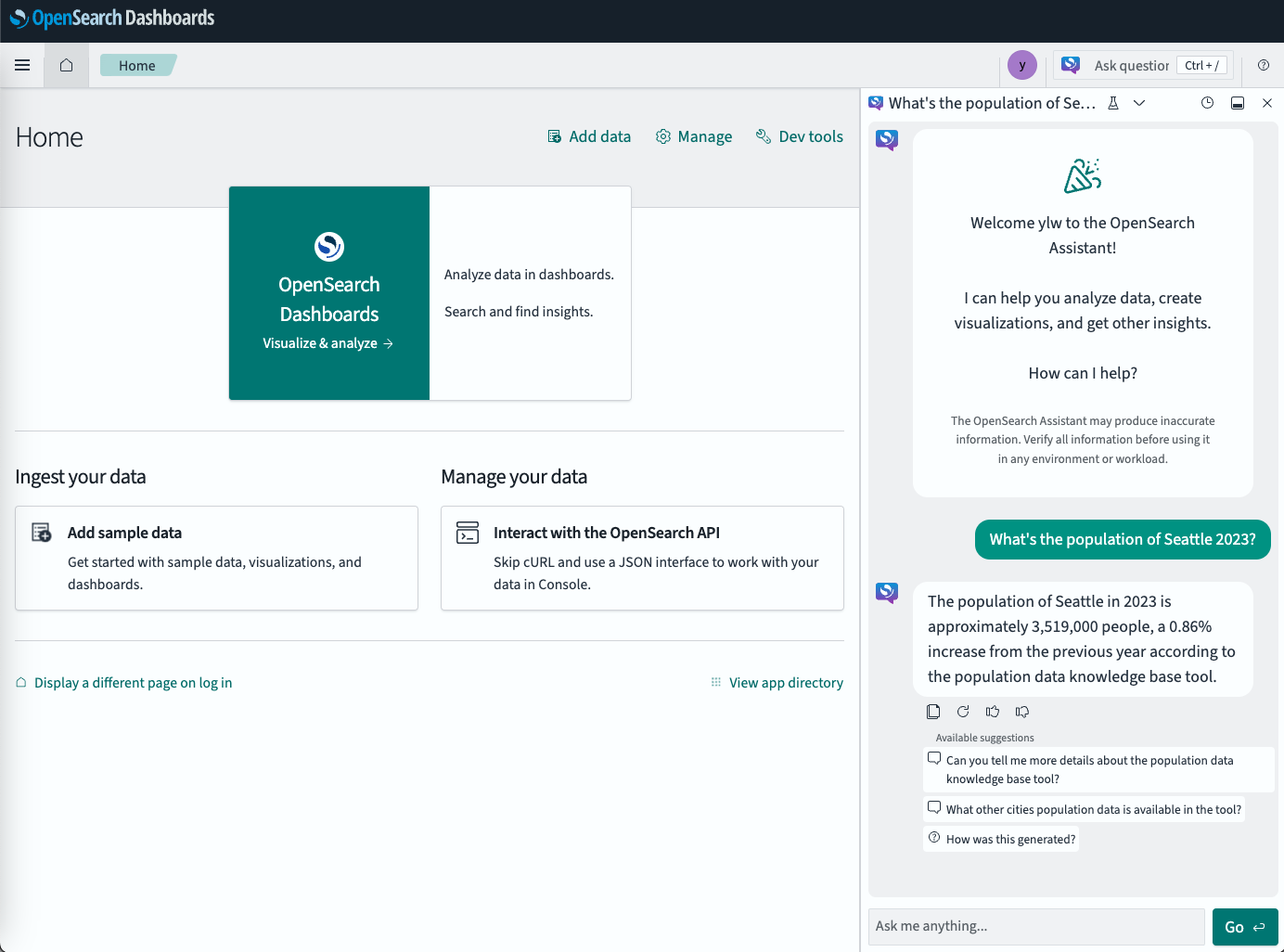
You can now chat in OpenSearch Dashboards, as shown in the following image.
Related documentation
- OpenSearch Assistant for OpenSearch Dashboards
- Conversational agents
- Register Agent API
- Vector DB tool