RAG using DeepSeek-R1 on Amazon Bedrock
This tutorial shows you how to implement retrieval-augmented generation (RAG) using Amazon OpenSearch Service and the DeepSeek-R1 model.
To run the steps in this tutorial from a Jupyter notebook, use the DeepSeek RAG demo notebook.
If you are using self-managed OpenSearch instead of Amazon OpenSearch Service, create a connector to the DeepSeek-R1 model using the blueprint. For more information about creating a connector, see Connectors. Then go directly to Step 4.
Replace the placeholders beginning with the prefix your_ with your own values.
Prerequisites
Before you start, fulfill the following prerequisites.
When configuring Amazon settings, only change the values mentioned in this tutorial. Keep all other settings at their default values.
Get access to DeepSeek-R1 on Amazon Bedrock
DeepSeek-R1 is a serverless model on Amazon Bedrock. You call it through the cross-Region inference profile us.deepseek.r1-v1:0, which routes requests to the deepseek.r1-v1:0 model in the us-east-1, us-east-2, and us-west-2 Regions. For more information, see Supported foundation models in Amazon Bedrock and Increase throughput with cross-Region inference.
Note the inference profile Amazon Resource Name (ARN), which has the format arn:aws:bedrock:your_bedrock_model_region:your_aws_account_id:inference-profile/us.deepseek.r1-v1:0; you’ll use it in the following steps.
Create an OpenSearch cluster
Go to the Amazon OpenSearch Service console and create an OpenSearch domain.
Note the domain ARN and URL; you’ll use them in the following steps.
Step 1: Create an IAM role for Amazon Bedrock access
To invoke the DeepSeek-R1 model on Amazon Bedrock, you must create an AWS Identity and Access Management (IAM) role with appropriate permissions. The connector will use this role to invoke the model.
Go to the IAM console, create a new IAM role named my_invoke_bedrock_deepseek_model_role, and add the following trust policy and permissions:
- Custom trust policy:
{
    "Version": "2012-10-17",
    "Statement": [
        {
            "Effect": "Allow",
            "Principal": {
                "Service": "es.amazonaws.com"
            },
            "Action": "sts:AssumeRole"
        }
    ]
}
- Permissions:
{
    "Version": "2012-10-17",
    "Statement": [
        {
            "Action": [
                "bedrock:InvokeModel"
            ],
            "Effect": "Allow",
            "Resource": [
                "your_DeepSeek_R1_inference_profile_ARN",
                "arn:aws:bedrock:*::foundation-model/deepseek.r1-v1:0"
            ]
        }
    ]
}
The role needs permissions for both the inference profile and the foundation model in each Region to which the profile routes requests.
Note the role ARN; you’ll use it in the following steps.
Step 2: Configure an IAM role in Amazon OpenSearch Service
Follow these steps to configure an IAM role in Amazon OpenSearch Service.
Step 2.1: Create an IAM role for signing connector requests
Generate a new IAM role specifically for signing your Create Connector API request.
Create an IAM role named my_create_bedrock_deepseek_connector_role with the following trust policy and permissions:
- Custom trust policy:
{
  "Version": "2012-10-17",
  "Statement": [
    {
      "Effect": "Allow",
      "Principal": {
        "AWS": "your_iam_user_arn"
      },
      "Action": "sts:AssumeRole"
    }
  ]
}
You’ll use the your_iam_user_arn IAM user to assume the role in Step 3.
- Permissions:
{
  "Version": "2012-10-17",
  "Statement": [
    {
      "Effect": "Allow",
      "Action": "iam:PassRole",
      "Resource": "your_iam_role_arn_created_in_step1"
    },
    {
      "Effect": "Allow",
      "Action": "es:ESHttpPost",
      "Resource": "your_opensearch_domain_arn/*"
    }
  ]
}
Note this role ARN; you’ll use it in the following steps.
Step 2.2: Map a backend role
Follow these steps to map a backend role:
- Log in to OpenSearch Dashboards and select Security on the top menu.
- Select Roles, and then select the ml_full_access role.
- On the ml_full_access role details page, select Mapped users, and then select Manage mapping.
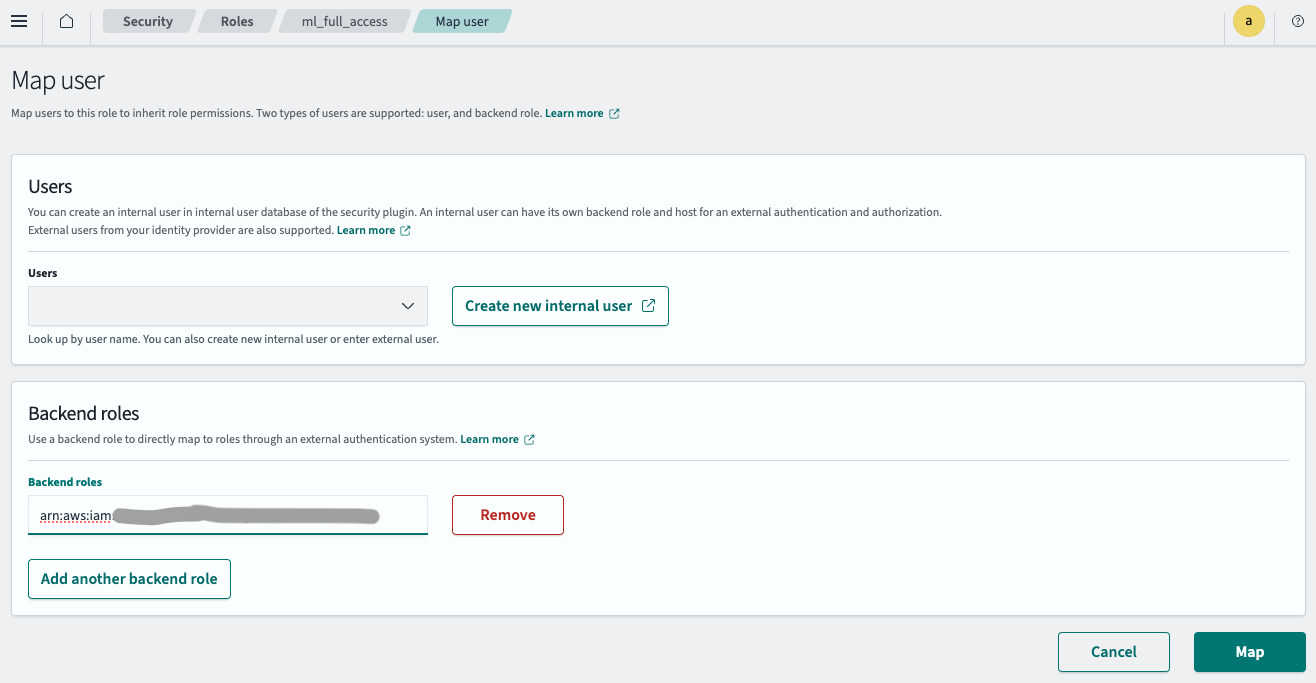
- Enter the IAM role ARN created in Step 2.1 in the Backend roles field, as shown in the following image.
- Select Map.
The IAM role is now successfully configured in your OpenSearch cluster.
Step 3: Create a connector
Follow these steps to create a connector for the DeepSeek-R1 model. For more information about creating a connector, see Connectors.
Run the following Python code with the temporary credentials fetched from AWS.
import boto3
import requests
from requests_aws4auth import AWS4Auth

host = 'your_amazon_opensearch_domain_endpoint'
region = 'your_amazon_opensearch_domain_region'
service = 'es'

assume_role_response = boto3.Session().client('sts').assume_role(
  RoleArn="your_iam_role_arn_created_in_step2.1",
  RoleSessionName="your_session_name"
)
credentials = assume_role_response["Credentials"]
awsauth = AWS4Auth(credentials["AccessKeyId"], credentials["SecretAccessKey"], region, service, session_token=credentials["SessionToken"])

path = '/_plugins/_ml/connectors/_create'
url = host + path

payload = {
  "name": "DeepSeek R1 model connector",
  "description": "Connector for my Bedrock DeepSeek model",
  "version": "1.0",
  "protocol": "aws_sigv4",
  "credential": {
    "roleArn": "your_iam_role_arn_created_in_step1"
  },
  "parameters": {
    "service_name": "bedrock",
    "region": "your_bedrock_model_region",
    "model_id": "us.deepseek.r1-v1:0",
    "temperature": 0,
    "max_tokens": 4000
  },
  "actions": [
    {
      "action_type": "PREDICT",
      "method": "POST",
      "url": "https://bedrock-runtime.${parameters.region}.amazonaws.com/model/${parameters.model_id}/invoke",
      "headers": {
        "content-type": "application/json"
      },
      "request_body": "{ \"prompt\": \"<|begin▁of▁sentence|><|User|>${parameters.inputs}<|Assistant|>\", \"temperature\": ${parameters.temperature}, \"max_tokens\": ${parameters.max_tokens} }",
      "post_process_function": "\n      return '{' +\n               '\"name\": \"response\",'+\n               '\"dataAsMap\": {' +\n                  '\"completion\":\"' + escape(params.choices[0].text) + '\"}' +\n             '}';\n    "
    }
  ]
}

headers = {"Content-Type": "application/json"}

r = requests.post(url, auth=awsauth, json=payload, headers=headers)
print(r.status_code)
print(r.text)
Set region to a Region in which the us.deepseek.r1-v1:0 inference profile is available. The connector sends requests to the Amazon Bedrock endpoint in that Region.
The script outputs a connector ID:
{"connector_id":"HnS5sJQBVQUimUskjpFl"}
Note the connector ID; you’ll use it in the next step.
Step 4: Create and test the model
Log in to OpenSearch Dashboards, open the DevTools console, and run the following requests to create and test the DeepSeek-R1 model.
-
Create a model group:
POST /_plugins/_ml/model_groups/_register { "name": "Bedrock DeepSeek model", "description": "Test model group for Bedrock DeepSeek model" }The response contains the model group ID:
{ "model_group_id": "Vylgs5QBts7fa6bylR0v", "status": "CREATED" } -
Register the model:
POST /_plugins/_ml/models/_register { "name": "Bedrock DeepSeek R1 model", "function_name": "remote", "description": "DeepSeek R1 model on Bedrock", "model_group_id": "Vylgs5QBts7fa6bylR0v", "connector_id": "KHS7s5QBVQUimUskoZGp" }The response contains the model ID:
{ "task_id": "hOS7s5QBFSAM-Wczv7KD", "status": "CREATED", "model_id": "heS7s5QBFSAM-Wczv7Kb" } -
Deploy the model:
POST /_plugins/_ml/models/heS7s5QBFSAM-Wczv7Kb/_deployThe response contains a task ID for the deployment operation:
{ "task_id": "euRhs5QBFSAM-WczTrI6", "task_type": "DEPLOY_MODEL", "status": "COMPLETED" } -
Test the model:
POST /_plugins/_ml/models/heS7s5QBFSAM-Wczv7Kb/_predict { "parameters": { "inputs": "hello" } }The response contains the text generated by the model:
 {
   "inference_results": [
     {
       "output": [
         {
           "name": "response",
           "dataAsMap": {
             "completion": """<think>\n\n</think>\n\nHello! How can I assist you today? 😊"""
           }
         }
       ],
       "status_code": 200
     }
   ]
 }
Step 5: Configure RAG
Follow these steps to configure RAG.
Step 5.1: Create a search pipeline
Create a search pipeline with a RAG processor:
PUT /_search/pipeline/my-conversation-search-pipeline-deepseek
{
  "response_processors": [
    {
      "retrieval_augmented_generation": {
        "tag": "Demo pipeline",
        "description": "Demo pipeline Using DeepSeek R1",
        "model_id": "heS7s5QBFSAM-Wczv7Kb",
        "context_field_list": [
          "text"
        ],
        "system_prompt": "You are a helpful assistant.",
        "user_instructions": "Generate a concise and informative answer in less than 100 words for the given question"
      }
    }
  ]
}
Step 5.2: Create a vector database
First, create an embedding model. Amazon OpenSearch Service doesn’t support local models, so use an externally hosted embedding model: follow Steps 1–4 of Semantic search using Amazon Bedrock Titan. In self-managed OpenSearch, you can instead use a local model, as described in Getting started with semantic and hybrid search.
Create an ingest pipeline that uses the embedding model to generate embeddings from the text field:
PUT /_ingest/pipeline/my-nlp-ingest-pipeline
{
  "description": "text embedding pipeline",
  "processors": [
    {
      "text_embedding": {
        "model_id": "your_embedding_model_id",
        "field_map": {
          "text": "passage_embedding"
        }
      }
    }
  ]
}
Create a vector index that uses the pipeline. The dimension must match the embedding model’s output dimension, which is 1,536 for the Amazon Bedrock Titan Text Embeddings model:
PUT /my-nlp-index
{
  "settings": {
    "index": {
      "default_pipeline": "my-nlp-ingest-pipeline",
      "knn": "true"
    }
  },
  "mappings": {
    "properties": {
      "passage_embedding": {
        "type": "knn_vector",
        "dimension": 1536,
        "space_type": "cosinesimil"
      },
      "text": {
        "type": "text"
      }
    }
  }
}
Ingest sample data into the index:
POST _bulk
{"index": {"_index": "my-nlp-index", "_id": "1"}}
{"text": "Chart and table of population level and growth rate for the Ogden-Layton metro area from 1950 to 2023. United Nations population projections are also included through the year 2035.\nThe current metro area population of Ogden-Layton in 2023 is 750,000, a 1.63% increase from 2022.\nThe metro area population of Ogden-Layton in 2022 was 738,000, a 1.79% increase from 2021.\nThe metro area population of Ogden-Layton in 2021 was 725,000, a 1.97% increase from 2020.\nThe metro area population of Ogden-Layton in 2020 was 711,000, a 2.16% increase from 2019."}
{"index": {"_index": "my-nlp-index", "_id": "2"}}
{"text": "Chart and table of population level and growth rate for the New York City metro area from 1950 to 2023. United Nations population projections are also included through the year 2035.\\nThe current metro area population of New York City in 2023 is 18,937,000, a 0.37% increase from 2022.\\nThe metro area population of New York City in 2022 was 18,867,000, a 0.23% increase from 2021.\\nThe metro area population of New York City in 2021 was 18,823,000, a 0.1% increase from 2020.\\nThe metro area population of New York City in 2020 was 18,804,000, a 0.01% decline from 2019."}
{"index": {"_index": "my-nlp-index", "_id": "3"}}
{"text": "Chart and table of population level and growth rate for the Chicago metro area from 1950 to 2023. United Nations population projections are also included through the year 2035.\\nThe current metro area population of Chicago in 2023 is 8,937,000, a 0.4% increase from 2022.\\nThe metro area population of Chicago in 2022 was 8,901,000, a 0.27% increase from 2021.\\nThe metro area population of Chicago in 2021 was 8,877,000, a 0.14% increase from 2020.\\nThe metro area population of Chicago in 2020 was 8,865,000, a 0.03% increase from 2019."}
{"index": {"_index": "my-nlp-index", "_id": "4"}}
{"text": "Chart and table of population level and growth rate for the Miami metro area from 1950 to 2023. United Nations population projections are also included through the year 2035.\\nThe current metro area population of Miami in 2023 is 6,265,000, a 0.8% increase from 2022.\\nThe metro area population of Miami in 2022 was 6,215,000, a 0.78% increase from 2021.\\nThe metro area population of Miami in 2021 was 6,167,000, a 0.74% increase from 2020.\\nThe metro area population of Miami in 2020 was 6,122,000, a 0.71% increase from 2019."}
{"index": {"_index": "my-nlp-index", "_id": "5"}}
{"text": "Chart and table of population level and growth rate for the Austin metro area from 1950 to 2023. United Nations population projections are also included through the year 2035.\\nThe current metro area population of Austin in 2023 is 2,228,000, a 2.39% increase from 2022.\\nThe metro area population of Austin in 2022 was 2,176,000, a 2.79% increase from 2021.\\nThe metro area population of Austin in 2021 was 2,117,000, a 3.12% increase from 2020.\\nThe metro area population of Austin in 2020 was 2,053,000, a 3.43% increase from 2019."}
{"index": {"_index": "my-nlp-index", "_id": "6"}}
{"text": "Chart and table of population level and growth rate for the Seattle metro area from 1950 to 2023. United Nations population projections are also included through the year 2035.\\nThe current metro area population of Seattle in 2023 is 3,519,000, a 0.86% increase from 2022.\\nThe metro area population of Seattle in 2022 was 3,489,000, a 0.81% increase from 2021.\\nThe metro area population of Seattle in 2021 was 3,461,000, a 0.82% increase from 2020.\\nThe metro area population of Seattle in 2020 was 3,433,000, a 0.79% increase from 2019."}
Step 5.3: Search the index
Run a vector search to retrieve documents from the vector database and use the DeepSeek model for RAG:
GET /my-nlp-index/_search?search_pipeline=my-conversation-search-pipeline-deepseek
{
  "query": {
    "neural": {
      "passage_embedding": {
        "query_text": "What's the population increase of New York City from 2021 to 2023? How is the trending comparing with Miami?",
        "model_id": "your_embedding_model_id",
        "k": 5
      }
    }
  },
  "size": 2,
  "_source": [
    "text"
  ],
  "ext": {
    "generative_qa_parameters": {
      "llm_model": "bedrock/claude",
      "llm_question": "What's the population increase of New York City from 2021 to 2023? How is the trending comparing with Miami?",
      "context_size": 5,
      "timeout": 15
    }
  }
}
The response includes both the relevant documents retrieved from the vector search (in the hits array) and the generated answer from the DeepSeek model (in the ext.retrieval_augmented_generation object):
{
  "took": 5,
  "timed_out": false,
  "_shards": {
    "total": 5,
    "successful": 5,
    "skipped": 0,
    "failed": 0
  },
  "hits": {
    "total": {
      "value": 6,
      "relation": "eq"
    },
    "max_score": 0.85223955,
    "hits": [
      {
        "_index": "my-nlp-index",
        "_id": "2",
        "_score": 0.85223955,
        "_source": {
          "text": "Chart and table of population level and growth rate for the New York City metro area from 1950 to 2023. United Nations population projections are also included through the year 2035.\\nThe current metro area population of New York City in 2023 is 18,937,000, a 0.37% increase from 2022.\\nThe metro area population of New York City in 2022 was 18,867,000, a 0.23% increase from 2021.\\nThe metro area population of New York City in 2021 was 18,823,000, a 0.1% increase from 2020.\\nThe metro area population of New York City in 2020 was 18,804,000, a 0.01% decline from 2019."
        }
      },
      {
        "_index": "my-nlp-index",
        "_id": "4",
        "_score": 0.7766204,
        "_source": {
          "text": "Chart and table of population level and growth rate for the Miami metro area from 1950 to 2023. United Nations population projections are also included through the year 2035.\\nThe current metro area population of Miami in 2023 is 6,265,000, a 0.8% increase from 2022.\\nThe metro area population of Miami in 2022 was 6,215,000, a 0.78% increase from 2021.\\nThe metro area population of Miami in 2021 was 6,167,000, a 0.74% increase from 2020.\\nThe metro area population of Miami in 2020 was 6,122,000, a 0.71% increase from 2019."
        }
      }
    ]
  },
  "ext": {
    "retrieval_augmented_generation": {
      "answer": """<think>
Okay, let's tackle this question. The user wants to know the population increase of New York City from 2021 to 2023 and compare the trend with Miami.

...
</think>

New York City's metro population increased by 114,000 from 2021 (18,823,000) to 2023 (18,937,000), with growth rates rising from 0.1% to 0.37%. Miami's metro population grew by 98,000 in the same period (6,167,000 to 6,265,000), but its growth rates were consistently higher (0.74% to 0.8%). While NYC saw a larger absolute increase due to its bigger size, Miami experienced faster percentage growth, reflecting a stronger upward trend. NYC's growth rebounded after a near-stable 2020, whereas Miami maintained steady, robust annual increases."""
    }
  }
}
Related documentation
- Conversational search with RAG
- Connectors for third-party ML platforms
- Retrieval-augmented generation processor
- Text embedding processor
- Neural query