Policy examples
The following examples are complete policies in JSON format. For the components of a policy, see Policies. To create a policy in OpenSearch Dashboards, see Creating a policy. To create one using the API, see ISM API.
Sample policy with ISM template for auto rollover
The following sample template policy is for a rollover use case.
If you want to skip rollovers for an index, set index.plugins.index_state_management.rollover_skip to true in the settings of that index.
-
Create a policy with an
ism_templatefield:PUT _plugins/_ism/policies/rollover_policy { "policy": { "description": "Example rollover policy.", "default_state": "rollover", "states": [ { "name": "rollover", "actions": [ { "rollover": { "min_doc_count": 1 } } ], "transitions": [] } ], "ism_template": { "index_patterns": ["log*"], "priority": 100 } } }You need to specify the
index_patternsfield. If you don’t specify a value forpriority, it defaults to 0. -
Set up a template with the
rollover_aliasaslog:PUT _index_template/ism_rollover { "index_patterns": ["log*"], "template": { "settings": { "plugins.index_state_management.rollover_alias": "log" } } } -
Create an index with the
logalias:PUT log-000001 { "aliases": { "log": { "is_write_index": true } } } -
Index a document to trigger the rollover condition:
POST log/_doc { "message": "dummy" } -
Verify if the policy is attached to the
log-000001index:GET _plugins/_ism/explain/log-000001?pretty
Example policy with ISM templates for the alias action
The following example policy is for an alias action use case.
In the following example, the first job will trigger the rollover action, and a new index will be created. Next, another document is added to the two indexes. The new job will then cause the second index to point to the log alias, and the older index will be removed due to the alias action.
First, create an ISM policy:
PUT /_plugins/_ism/policies/rollover_alias_policy
{
  "policy": {
    "description": "Example alias action policy.",
    "default_state": "rollover",
    "states": [
      {
        "name": "rollover",
        "actions": [
          {
            "rollover": {
              "min_doc_count": 1
            }
          }
        ],
        "transitions": [{
            "state_name": "alias",
            "conditions": {
              "min_doc_count": "2"
            }
          }]
      },
      {
        "name": "alias",
        "actions": [
          {
            "alias": {
              "actions": [
                {
                  "remove": {
                      "alias": "alias-log"
                  }
                }
              ]
            }
          }
        ]
      }
    ],
    "ism_template": {
      "index_patterns": ["alias-log*"],
      "priority": 100
    }
  }
}
An ism_template whose index patterns overlap those of an existing policy at the same priority is rejected, so this policy uses its own alias-log* pattern rather than the log* pattern of the preceding example.
Next, create an index template on which to enable the policy:
PUT /_index_template/ism_rollover_alias
{
  "index_patterns": ["alias-log*"],
  "template": {
   "settings": {
    "plugins.index_state_management.rollover_alias": "alias-log"
   }
 }
}
Next, change the cluster settings to trigger jobs every minute:
PUT /_cluster/settings?pretty=true
{
  "persistent" : {
    "plugins.index_state_management.job_interval" : 1
  }
}
Next, create a new index:
PUT /alias-log-000001
{
  "aliases": {
    "alias-log": {
      "is_write_index": true
    }
  }
}
Finally, add a document to the index to trigger the job:
POST /alias-log-000001/_doc
{
  "message": "dummy"
}
You can verify these steps using the Alias and Index API:
GET /_cat/indices?pretty
GET /_cat/aliases?pretty
The index and remove_index parameters are not allowed with alias action policies. Only the add and remove alias action parameters are allowed.
When you are finished, restore the job interval to its default so that the shortened interval does not apply to every managed index in the cluster:
PUT /_cluster/settings
{
  "persistent" : {
    "plugins.index_state_management.job_interval" : null
  }
}
Example policy
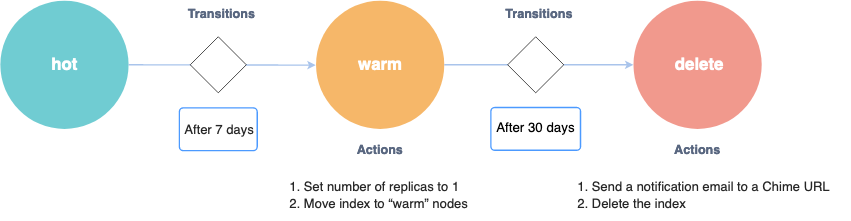
The following example policy implements a hot, warm, and delete workflow. You can use this policy as a template to prioritize resources to your indexes based on their levels of activity.
In this case, an index is initially in a hot state. After 7 days, it changes to a warm state, where the number of replicas is reduced to 1 and the indexes are moved to nodes with the warm attribute.
After 30 days, the policy moves this index into a delete state. The service sends a notification to a Chime room that the index is being deleted, and then permanently deletes it.
PUT _plugins/_ism/policies/hot_warm_delete_policy
{
  "policy": {
    "description": "hot warm delete workflow",
    "default_state": "hot",
    "states": [
      {
        "name": "hot",
        "actions": [
          {
            "rollover": {
              "min_index_age": "7d",
              "min_primary_shard_size": "30gb"
            }
          }
        ],
        "transitions": [
          {
            "state_name": "warm"
          }
        ]
      },
      {
        "name": "warm",
        "actions": [
          {
            "replica_count": {
              "number_of_replicas": 1
            }
          },
          {
            "allocation": {
              "require": {
                "temp": "warm"
              }
            }
          }
        ],
        "transitions": [
          {
            "state_name": "delete",
            "conditions": {
              "min_index_age": "30d"
            }
          }
        ]
      },
      {
        "name": "delete",
        "actions": [
          {
            "notification": {
              "destination": {
                "chime": {
                  "url": "<URL>"
                }
              },
              "message_template": {
                "source": "The index {{ctx.index}} is being deleted"
              }
            }
          },
          {
            "delete": {}
          }
        ]
      }
    ],
    "ism_template": {
      "index_patterns": ["index-*"],
      "priority": 100
    }
  }
}
This diagram shows the states, transitions, and actions of the preceding policy as a finite-state machine. For more information about finite-state machines, see Wikipedia.