Index operations
An index is the basic unit of data storage in OpenSearch. Over the lifetime of an index, you create it, inspect its settings and statistics, close it while you change static settings, reopen it, and eventually delete it. You can perform each of these operations using the core index APIs or from the Index Management page in OpenSearch Dashboards.
For information about maintenance operations such as refresh, flush, force merge, shrink, and split, see Index maintenance.
Creating an index
You can let OpenSearch create an index implicitly when you index the first document into it, or you can create the index explicitly so that you control its mappings and settings from the start. Create the index explicitly when you need a specific number of shards, a custom refresh interval, or field mappings that differ from the dynamically inferred ones.
The following request creates an index with two primary shards, one replica, and a date mapping for the timestamp field:
PUT /logs-2026
{
  "settings": {
    "index": {
      "number_of_shards": 2,
      "number_of_replicas": 1
    }
  },
  "mappings": {
    "properties": {
      "timestamp": { "type": "date" },
      "message": { "type": "text" }
    }
  }
}
For all available settings and mappings, see Create Index. To apply the same settings and mappings to every index whose name matches a pattern, use an index template.
Index names must follow the naming restrictions for indexes.
Viewing index information
To retrieve the settings, mappings, and aliases of an index, use the Get Index API:
GET /logs-2026
To check whether an index exists without retrieving it, use Index Exists. To resolve an alias, data stream, or wildcard expression to the concrete indexes it covers, use Resolve Index. For document counts, store size, and per-operation metrics, use Index Stats.
Closing and opening an index
A closed index rejects read and write requests and releases the memory its shards were using, but its data remains on disk. Close an index when you need to change a static setting, which can only be updated on a closed index, or when you want to retain an index that is no longer queried without paying its memory cost.
To close an index, use the Close Index API:
POST /logs-2026/_close
To make the index available again, use the Open Index API:
POST /logs-2026/_open
For the list of settings that require a closed index, see Index settings.
Deleting an index
Deleting an index removes its documents, shards, and metadata. Use the Delete Index API:
DELETE /logs-2026
A deleted index cannot be recovered unless you restore it from a snapshot.
To delete indexes on a schedule rather than manually, define an Index State Management policy with a delete action.
Index operations in OpenSearch Dashboards
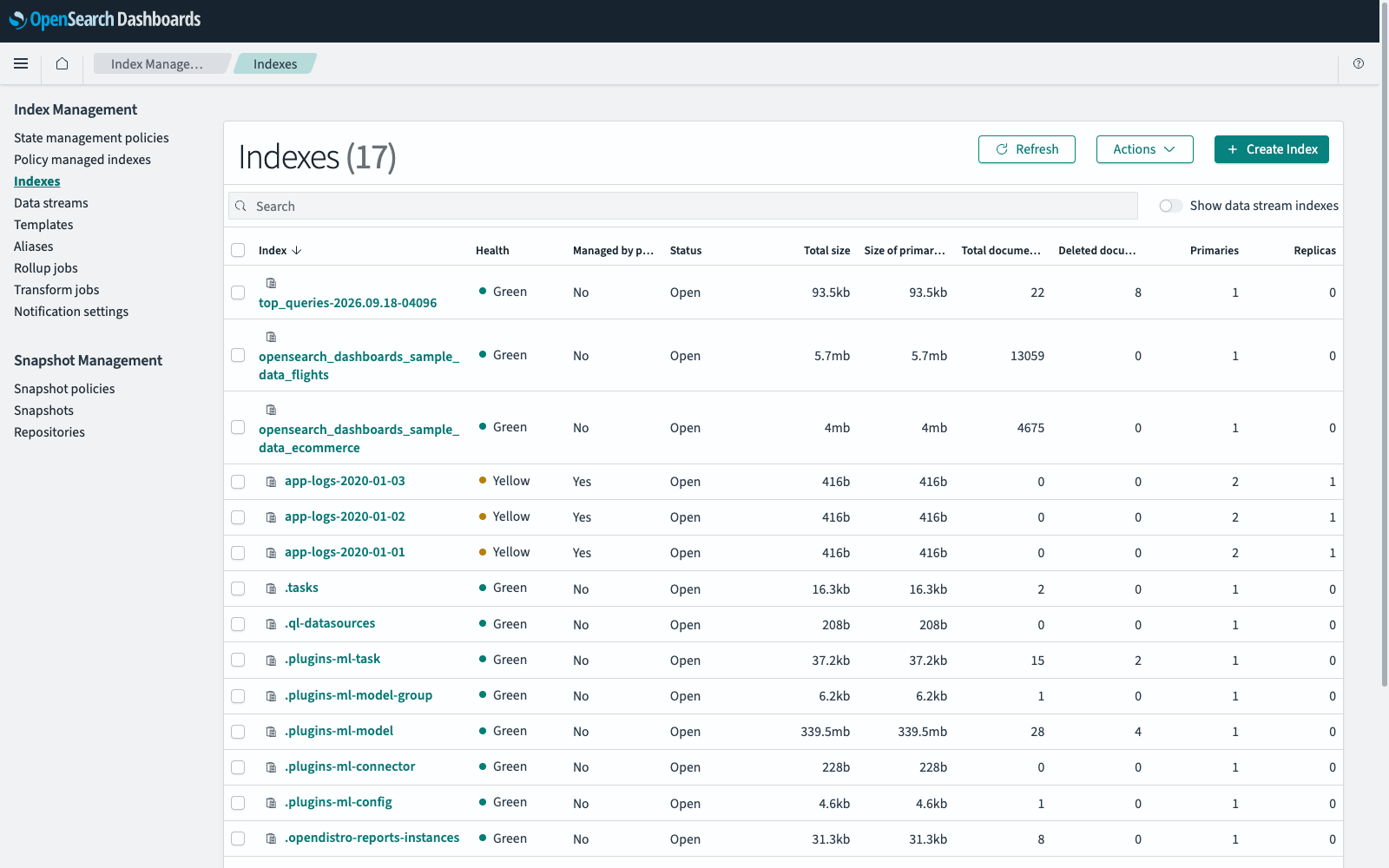
To navigate to the Index Management page, go to Management > Index Management on the top menu. The Indexes page lists the indexes in your cluster and provides the following information about each one.
| Column | Description |
|---|---|
| Index | The name of the index. |
| Health | The replication status of the index: green (all primary and replica shards are assigned), yellow (at least one replica shard is not assigned), or red (at least one primary shard is not assigned). |
| Managed by policy | Whether an Index State Management policy applies to the index, either directly or through an alias. |
| Status | Whether the index is open or closed. |
| Total size | The storage used by the index across all primary and replica shards. |
| Size of primaries | The storage used by the index across all primary shards. |
| Total documents | The number of documents in the index. |
| Deleted documents | The number of documents deleted from the index. |
| Primaries | The number of primary shards. |
| Replicas | The number of replica shards for each primary shard. |
Because the list can span several pages, use the search box to find an index by name.
The following image shows the Indexes page.
Viewing index details
- In Index Management, select Indexes.
- Select an index name in the Index column.
The index page shows an Overview panel with metrics for the index, along with Settings, Mappings, and Alias tabs that you can edit. To return to the list, select Indexes in the breadcrumb trail.
Creating an index
- In Index Management, select Indexes, and then select Create Index.
- In Define index, enter an index name. Optionally, select existing aliases for the index or enter the name of a new alias to create.
- In Index settings, enter the number of primary shards, the number of replicas, and the refresh interval. The default refresh interval is
1s. To supply additional settings as a flat JSON object, expand Advanced settings. For the available options, see Index settings. - In Index mapping, define the fields in your documents. Select Visual editor to add fields one at a time or JSON editor to paste an existing mapping. In the visual editor, select Add new field or Add new object, enter a field name, and select a field type. For an object field, select the
 (plus) icon to add nested fields. This panel is optional; if you leave it empty, OpenSearch infers mappings from the first documents you index.
 - Select Create. Any new aliases that you specified are created along with the index.
To create an append-only index, add the following setting in Advanced settings before you create the index:
"index.append_only.enabled": "true"
An index cannot be converted to or from an append-only index after it is created.
Editing an index
- In Index Management, select Indexes.
- Select an index name in the Index column.
-
Select the tab for what you want to change:
- To change the number of replicas or the refresh interval, select Settings. To supply other settings as a flat JSON object, expand Advanced settings. You cannot change the number of primary shards of an existing index; to change it, shrink or split the index instead.
- To add fields or objects, select Mappings. You cannot change the name or type of an existing field.
- To add an alias, select an existing alias, or remove one, select Alias. To remove an alias, select the
 (cross) icon next to its name.
- Select Save.
Closing an index
- In Index Management, select Indexes.
- Select the checkbox next to each index that you want to close.
- Select Actions, and then select Close.
- Enter
closein the confirmation dialog, and then select Close.
Opening an index
- In Index Management, select Indexes.
- Select the checkbox next to each closed index that you want to open.
- Select Actions, and then select Open.
- Select Open in the confirmation dialog.
Deleting an index
- In Index Management, select Indexes.
- Select the checkbox next to each index that you want to delete.
- Select Actions, and then select Delete.
- Enter
deletein the confirmation dialog, and then select Delete.
Applying a policy
To attach an Index State Management policy to an index from the index list:
- In Index Management, select Indexes.
- Select the checkbox next to each index that you want the policy to manage.
- Select Actions, and then select Apply policy.
- Select a policy from Policy ID. A preview of the policy is displayed.
- If the policy includes a
rolloveraction, enter an existing alias in Rollover alias. - Select Apply.
For more information, see Managed indexes.
Permissions and error reporting
Permissions are enforced at the API level through permissions and action groups. OpenSearch Dashboards does not add a separate layer of permission control: you can view the Index Management pages if you have access to them, and you can complete an operation if you have permission to call the corresponding API.
An operation that fails immediately reports an error in the interface. For an operation that runs longer, the failure is reported when it occurs. You can also check the state of an operation in the Status column of the index list. For more information, see Checking the status of long-running operations.